Installed new 7800 AGP Video Card - Need AGP Driver Help

Collapse
X
 
  • Time
  • Show
Clear All
new posts
  • Trevortt

    #16
    Re: Installed new 7800 AGP Video Card - Need AGP Driver Help

    try updating ur BIOS

    Comment

    • IndianScout

      #17
      Re: Installed new 7800 AGP Video Card - Need AGP Driver Help

      I would suspect the PSU also

      Comment

      • alextaylor29
        Member
        • Sep 2006
        • 196

        #18
        Re: Installed new 7800 AGP Video Card - Need AGP Driver Help

        Is Bios different from the Nforce 3 driver update I did for my mobo? Also what's a recommended power supply you guys would suggest for me? I have a full tower case so there's plenty of room and I'd like one that quiet at at least 550W. I currently have a 400Watt Power Supply. I mean if you're going to upgrade, go much bigger is what I always say.

        Thanks this is really helping!

        Comment

        • Xanthias

          #19
          Re: Installed new 7800 AGP Video Card - Need AGP Driver Help

          I was going to suggest he check that his power cable is actually connected to the video card. Many people forget to do that. However, seeing that he only has a 400W PS, like it was suggested above, getting a bigger one should do the trick. 550W should do nicely. :-]

          Comment

          • -[MDS]-Stormy

            #20
            Re: Installed new 7800 AGP Video Card - Need AGP Driver Help

            I'm not technical enough to check voltage on my power supply
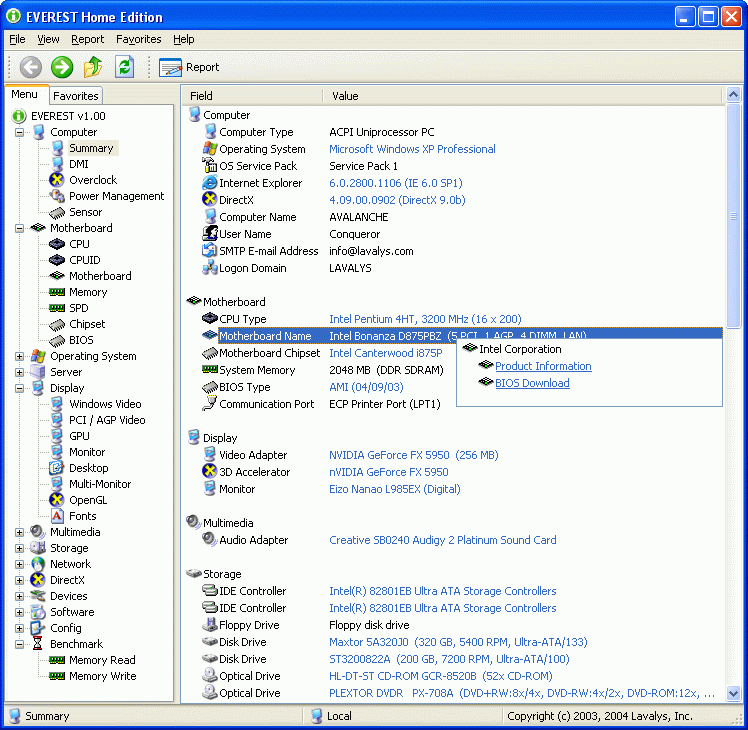
            Nothing technical about it, just take the side panel off the computer and read the label on the side of the psu. As far as what the voltages are, download and install this,

            EVEREST Home Edition is a freeware system information, system diagnostics and benchmarking solution for home PC users, based on the award-winning EVEREST Technology....


            then post back what the readings for the 12, 5 and 3.3V readings.

            Comment

            • alextaylor29
              Member
              • Sep 2006
              • 196

              #21
              Re: Installed new 7800 AGP Video Card - Need AGP Driver Help

              Yes just to mention it my power cable is correctly connected to the video card.

              OK well I attempted to re-flash my bios with an updated version of MSI's bios (my Mobo's manufacturer) and it said it was successful. However when the computer when to reboot it errors out saying,

              "Windows could not start because the following file is missing or corrupt: Winnt\inf\biosinfo.inf"

              So now my entire computer in inopperable.

              And to think all I wanted to do was upgrade my video card. LOL. Well I'm going to take it to PC Doctor's down the street pay them $100 to get it to work and if it can't I guess EVGA's card simply won't work with my system and I plan on returning it.

              This has been an amazingly painful experience, and I've upgraded my GPU 5X since 1998.

              Unless I've missed something incredibly obvious, I'm thoroughly disapointed with EVGA and their GPU. I've done everything as instrucuted and in logical fashion.

              Amazing...

              Comment

              • Xanthias

                #22
                Re: Installed new 7800 AGP Video Card - Need AGP Driver Help

                Get a BFG! They have a lifetime guarantee! Mine's a 7800GSOC... :-]

                Comment

                • alextaylor29
                  Member
                  • Sep 2006
                  • 196

                  #23
                  Re: Installed new 7800 AGP Video Card - Need AGP Driver Help

                  Or a Gainward. They just released a 512MB AGP version yesterday!

                  DOH!

                  Comment

                  • LoD

                    #24
                    Re: Installed new 7800 AGP Video Card - Need AGP Driver Help

                    Im sorry to say this, but the problem is located entirely between the keyboard and the back of the chair.

                    No offense but the odds of this being the video card are slim to none. Its an other component or you.

                    Comment

                    • filthyscumbag

                      #25
                      Re: Installed new 7800 AGP Video Card - Need AGP Driver Help

                      I also went from a 6800GT to a 7800GS BFG and I must say this card is awesome. I'm using the 24.12? nvida drivers. Sorry I'm at work and can't double check that. Also my PS is 480watt.

                      Comment

                      • <}US{>Mother

                        #26
                        Re: Installed new 7800 AGP Video Card - Need AGP Driver Help

                        Quote.....my video totally locks up and the screen goes haywire and my computer makes a loud continuous beeping tone~>>sounds like post beep for ram ....reseat the ram in different locations and are you using matching ram sticks??
                        ALSO MAKE SURE YOUR CHIP SET FAN IS TURNING
                        also reseat the video card and reboot
                        The Nvidia drivers are the same for the 6800 and the 7800 i went from twin 6800s in sli to a single 7800GTX screaming at 100fps
                        AND CHECK THE 12V POWER Supply HAhas at least 11.85v to it card


                        <}US{>Mother
                        NYC desktop support Tech

                        Comment

                        • Xanthias

                          #27
                          Re: Installed new 7800 AGP Video Card - Need AGP Driver Help

                          Hey, Mother...

                          You see this yet from Alienware? (http://www.alienware.com/intro_pages...px?source=1926)
                          I hate that Dell is getting ahold of these guys! :-/

                          Comment

                          • -[MDS]-Stormy

                            #28
                            Re: Installed new 7800 AGP Video Card - Need AGP Driver Help

                            Originally posted by twsmit
                            Im sorry to say this, but the problem is located entirely between the keyboard and the back of the chair.

                            No offense but the odds of this being the video card are slim to none. Its an other component or you.
                            Just a little add on to that. The suggestion to update the bios was real good, especially when the guy didn't even know how to find the drivers for his motherboard.

                            Oh and alextaylor29, still waiting to hear what the amps on the 12, 5, and 3.3V are, as well as what the voltage readings for the three are.

                            P.S. If you have a legit XP cd, save the $100 and re-install yourself, it isn't that hard to do,


                            complete with words and pictures.

                            Comment

                            • <}US{>Mother

                              #29
                              Re: Installed new 7800 AGP Video Card - Need AGP Driver Help

                              sHEESH --Dell kIDDIES cant compare with what i can build!
                              CHECK MY ARSENAL
                              My Machine Arsenal for BF2 gaming only!

                              24' Inch Viewsonic CRT Monitor resolution at 1280 x 1024 @85MHZ
                              Thermaltake Xazer III Server Box in blue
                              AMD Athlon 64 FX55 1GHz FSB Socket 939 Processor 39' Temp full load
                              ASUS A8N-SLI Deluxe ATX AMD Motherboard
                              2 X Western Digital Raptor WD360GD 36.7GB 10,000 RPM 8MB Cache Serial ATA150 Hard Drive
                              Thermaltake VENUS 12 80mm Ball Cooling Fan/Heatsink 5800RPMS LOUD!
                              Kingston ValueRAM 2GB 184-Pin DDR SDRAM DDR400 (PC3200) Dual channel
                              BFG Tech BFGR78256GTXOC Geforce 7800GTX 256MB 256-bit GDDR3 VIVO PCI Express x16 Video Card ....BFG stock Clocked to 1395/465 51' Temp full load
                              Ultra / X-Finity / 600-Watt / ATX / Dual 80mm Fan / SATA-Ready / SLI Ready / Blue / Power Supply
                              NEC Black IDE/ATAPI DVD Burner Model ND-3550A
                              8 x COOLER MASTER TLF-S82-EB RT 80mm Sleeve Blue LED Light Case Cooling Fan
                              Logitech 963290-0403 Extreme 3D Pro USB Joystick
                              Logitech G15 2-Tone 104 Normal Keys USB Wired Standard Keyboard
                              Logitech MX518 931352-0403 2-Tone 8 Buttons 1x Wheel USB + PS/2 Optical Mouse
                              Icemat 2nd edition - black *** unbelievable product!
                              Creative Sound Blaster Audigy2 ZS Platinum Pro 70SB036000000 8 (7.1) Channels 24-bit 192KHz PCI Interface Sound Card

                              Completly Set up in 25 minutes... Installed XP Pro operating system in 9 minutes.
                              Boots to desktop in 16 seconds ready to go...clocked at 2.9GHZ


                              Comment

                              • Verzili
                                Member
                                • Apr 2006
                                • 969

                                #30
                                Re: Installed new 7800 AGP Video Card - Need AGP Driver Help

                                ok you have a 400 watt psu(500+ with 18amp or higher on the 12v rail needed)

                                you have the power cable conected to the card( but are you using a power cable just for youre card or is it being shared with a dvd/hardrive?)

                                make sure its got a power cablew thats not conected to anything else.

                                how many harddrives/dvd roms /fans ect do you have in youre pc?

                                350 min for card then add extra on for all youre extra's and you may be exeding the 400 that you have.

                                my tip for you is get a new psu(recomend a new one everytime the cpu is majorly upgraded)
                                get 500+ and check the amprage on the 12v rail some high watt psu dont have enough power going there.

                                tba i dont think its youre agp driver,
                                example anyone that has a gfx card that needs to have power supply pluged in if you take it out the card will run but wont run games.

                                similar is happening to you,which suggest's to me its not getting enough power.

                                getting a new psu is going to be worth youre while.

                                goodluck.

                                Comment

                                Working...