Something isn't right, 7800 GT.

Collapse
X
 
  • Time
  • Show
Clear All
new posts
  • Herox

    #31
    Originally posted by Al3x
    Herox arent u glad you didnt touch it lol :P
    If you have unmatched memory that can be the problem yea.
    Indeed I am. Haha.

    Now what do you guys mean by unmatched memory? I have 3 sticks of the same memory, all came in the mail at the same time.


    ALSO:

    Quote:
    Originally Posted by xcannon69
    Hey maybe your power supply is bottlenecking your graphics card. How many amps does your PSU have on the 12V rail? Monitors shouldn't affect 3D performance at all.


    500 Watt PSU, i dont know about the amps on my 12V rail, im a newb to PSU's lol.

    Where can I find that information? The only thing I don't know about are PSU's, so please tell me, can I find this information in the BIOS? Where?

    -Herox

    Hello! Anyone there? :cry:

    lol

    -Herox

    Comment

    • UnrealAlex

      #32
      Re: Something isn't right, 7800 GT.

      It still may be a driver problem. First learn (if u dont know already) how to properly clean/install drivers, and then look around for people with your card and find out what the most popular drivers are, and try them out.

      Comment

      • xcannon69

        #33
        Re: Something isn't right, 7800 GT.

        Ok I think your problem may either be with your PSU or your drivers.(If it were a ram problem, BF2 would CTD to desktop nonstop after loading the map)

        1. Checking the PSU:
        You mention your PSU has an rating of 500 watts. This is enough power but your PSU may not deliver clear consistent power on the 12v rail(most generic PSUs don't provide clean and consistent power).

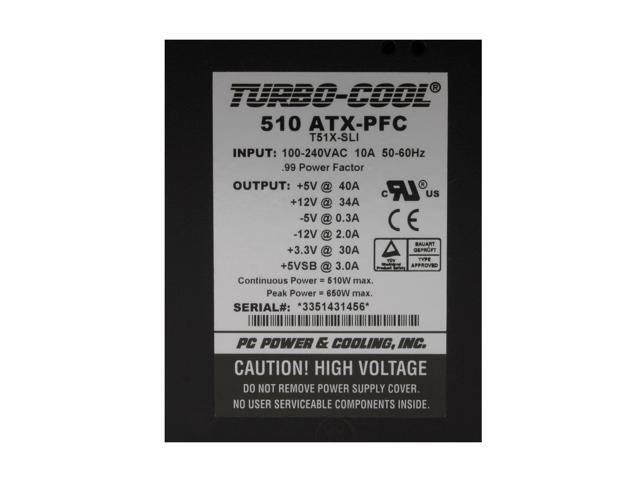
        Example: click on pic


        That picture shows +12V @ 34 A and the PSU is made by a PC Power and Cooling(best PSU company ever)

        Therefore that PSU has 34 amps on the 12v rail.
        -----------------------------------------------------------------------------
        2. Next your video card driver may be install improperly. Follow these steps ever time you remove and reinstall a different driver.

        Before you begin download:
        Driver Cleaner Pro(make sure you get the live updates !!!!!!!; http://www.drivercleaner.net/

        Crap Cleaner; http://www.ccleaner.com/

        1. In the add/remove options in the control panel, uninstall nvidia display drivers.
        2. Run Crap Cleaner
        3. reboot computer into safe mode and run driver cleaner pro; check select mutiple cleaning filters and select nvidia and nvidia WDM from drop downlist and click on start. Reboot
        4. Install your drivers. Reboot
        5. Done

        --------------------------------------------------------------------------
        3. If all else fails, begin backing everthing up and do a format and reinstall windows xp.

        I need a breather.....

        Comment

        • imported_Wasp

          #34
          Re: Something isn't right, 7800 GT.

          Originally posted by Herox
          Indeed I am. Haha.

          Now what do you guys mean by unmatched memory? I have 3 sticks of the same memory, all came in the mail at the same time.


          -Herox
          You bought 3 sticks of memory to a dual channel motherboard? I suggest you take one out and leave the other 2 in the correct memory slots so that the BIOS reports dual channel 128 bit in the boot screen. You can also use Everest home edition to check that it is actually running dual channel. You might also have to go into BIOS and set 1T/2T command manually to 1T command afterwards.

          Comment

          • Herox

            #35
            Originally posted by xcannon69
            Ok I think your problem may either be with your PSU or your drivers.(If it were a ram problem, BF2 would CTD to desktop nonstop after loading the map)

            1. Checking the PSU:
            You mention your PSU has an rating of 500 watts. This is enough power but your PSU may not deliver clear consistent power on the 12v rail(most generic PSUs don't provide clean and consistent power).

            Example: click on pic


            That picture shows +12V @ 34 A and the PSU is made by a PC Power and Cooling(best PSU company ever)

            Therefore that PSU has 34 amps on the 12v rail.
            -----------------------------------------------------------------------------
            2. Next your video card driver may be install improperly. Follow these steps ever time you remove and reinstall a different driver.

            Before you begin download:
            Driver Cleaner Pro(make sure you get the live updates !!!!!!!; http://www.drivercleaner.net/

            Crap Cleaner; http://www.ccleaner.com/

            1. In the add/remove options in the control panel, uninstall nvidia display drivers.
            2. Run Crap Cleaner
            3. reboot computer into safe mode and run driver cleaner pro; check select mutiple cleaning filters and select nvidia and nvidia WDM from drop downlist and click on start. Reboot
            4. Install your drivers. Reboot
            5. Done

            --------------------------------------------------------------------------
            3. If all else fails, begin backing everthing up and do a format and reinstall windows xp.

            I need a breather.....
            Ill try that driver thing, as for my PSU, specs are below in the picture.


            -Herox

            Originally posted by Wasp
            You bought 3 sticks of memory to a dual channel motherboard? I suggest you take one out and leave the other 2 in the correct memory slots so that the BIOS reports dual channel 128 bit in the boot screen. You can also use Everest home edition to check that it is actually running dual channel. You might also have to go into BIOS and set 1T/2T command manually to 1T command afterwards.
            I know for a fact it says 2T in the Bios. Is this BAD for my performance?

            -Herox

            Comment

            • imported_Wasp

              #36
              Re: Something isn't right, 7800 GT.

              Originally posted by Herox
              I know for a fact it says 2T in the Bios. Is this BAD for my performance?

              -Herox
              The main difference between AMD 64 socket 939 and 754 is in the memory controller which is dual channel on the socket 939. Incase you are not aware of this dual channel means running 2 memory sticks as they where one hence increasing the bandwidth from 64 bit to 128 bit. In memory performance this means an increase from approximately 3000mb/s to 6000mb/sec.

              On your motherboard you should have bought either 2 or 4 memory sticks to achieve this. The 2T command have to be there also when you use more than 2 memory sticks. The difference in performance between 1T and 2T command is about 1000mb/sec.

              So therefore I recommend you pull out one stick and set the other two in the right slots to get dual channel operation. On the AN8 I think it is slot 1 and 3. When you have done that you can check in the BIOS if it's using 1T command.

              Comment

              • xcannon69

                #37
                Re: Something isn't right, 7800 GT.

                PSU is fine. Problem lies with your drivers.

                Comment

                Working...