
Just wanted to ask you all: what do you do every day/week/month to keep your computer running at its best?
-
-
Re: Speeding up your PC.
I do a virus scan and a disk defrag every weekend. Every 2 weeks or so I'll uninstall and delete programs I don't use anymore. And about once every 2 months or so I'll delete stuff in the registry that I don't need anymore.
I also try deleting internet explorer cookies and temporary internet files every month -
Re: Speeding up your PC.
Alright, thanks. Wanted to ask about the defragging. I know how to do it and all, but what exactly does it do?Comment
-
Re: Speeding up your PC.
Something like.... over time the information on your hard drive gets scattered around. Because of this, the needle on the disk (I think?) has to look more to find the information you need. This will slow the computer down because it has to find the right pieces of information.
So when you defrag your hard drive, it finds all the information that's scattered around, sorts it and puts it together so its easier to find.
I think that's rightComment
-
Re: Speeding up your PC.
Yes, data becomes spread apart on a disc, and it takes the read needle longer to scan the hard disk for each piece of info.
Defragmenting it puts the data back together so it doesn't have to scan the disc as much.Comment
-
Re: Speeding up your PC.
hmm i should do a defrag once in a while then, how long can do u have to leave ur PC running in order for the operation to finish? oh and it does not misplace ur folders does it?Comment
-
Re: Speeding up your PC.
|If you haven't done it for a while, it can take hours...Comment
-
Re: Speeding up your PC.
woow may leave it overnight then, thnx alex.Comment
-
Re: Speeding up your PC.
havent done it for 2 years..
how long would it take?
weeks?
anyway to do a faster defragment?
fastest way of it?Comment
-
Re: Speeding up your PC.
I've had my computer for 4 months now..and tried defraggin the other day and it was well over 7 hours until i wanted to play a game and stopped it :PComment
-
Re: Speeding up your PC.
go to ur local hardware store.. buy some white spray paint! and paint some racing stripes on the side of ur case! i guarentee it will run atleast twice as fast!... or just don't download crap and do regular virus scans..Comment
-
Re: Speeding up your PC.
i remember there was a thread about defragmentation..there you and some other guys linked some program-sites so the defragmentation can be done faster..can you link me?
i did it but it didnt work:cry:Originally posted by xX5N1P3RXx
are you shietting me?
:cry::cry:
Comment
-
Re: Speeding up your PC.
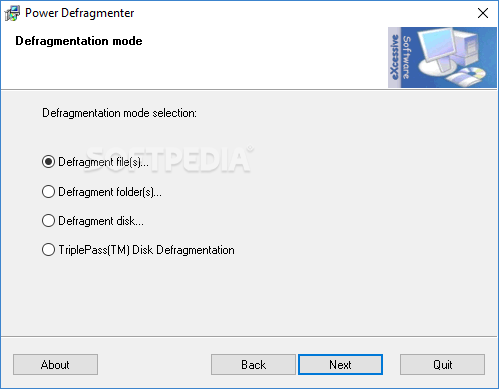
thats Power Defrag..best one I've ever used.
As for other things.. give ccleaner a run, check for spyware etc..
If your using XP download and run TuneXP just make sure you research on what you need to change..but mostly use the defrag boot files and ultra defrag which means it pushes all the boot files to the front of the drive for faster loading and unloading.
Then look at tweaking the TCP/IP stack perhaps using TCP Optimizer..grab it over here www.speedguide.net
Next just trash any and all toolbars, you don't need them they are a waste of space and I don't care what others may say its the truth. Remove all other junk programs that might not be needed.. hit the msconfig for startup and kill all things in the startup menu that you don't running and can run on a as needed task.
Last you can kill un needed services through services.msc use BlackVipers guide to figure out what you can and can't turn off if you've never fooled with it much.
Comment

Comment