Re: This is BS...
yep it sounds like throttling.
lower your resolution... 1920x1200 can even overheat desktops.
-
Re: This is BS...
You have to extract the files into a folder like c:\real tempOriginally posted by groundedzero
Run REAL TEMP, click the SETTINGS button put a check mark next to LOG FILE change seconds to 1 click APPLY.
THen go play, when you are done playing come back to the real temp folder and you should have a log file named realtemplog
Open the file with like notepad and look for a change in frequency(MHZ), should be pretty easy to just scroll down looking for a change in the numbers. We are also looking for a major change, say your PC is running at 2533.33 MHz and drops down to 2533.32 MHz wouldn't be major. but 2533.33 MHz to 2400.00 MHz would be major. Basically your pc will keep dropping its frequency so it doesn't burn your CPU up.
Make sure this change in frequency happens when the LOAD% is high and while you are gaming. Many PC's will throttle CPU frequency when the LOAD% is really low to conserve power. Like If I'm sitting back watching a movie on hulu my laptop cpu will throttle itself down to conserve power.
Go ahead and post what type of temps you are getting while playing alsoLeave a comment:
-
Re: This is BS...
Luna - I dled the Launcher program, but when I click Launch BC2 nothing actaully happens, I just get the "This program needs permission to continue" then my cursor goes into a little CD and then nothing happens...
Also, for the RealTemp, do I have to click anything else to make it start logging what's going on?
Edit: got the launcher to work :p But I'm still not sure what I'm supposed to do with RealTemp.Leave a comment:
-
Re: This is BS...
Render ahead allows your pc to render frames before displaying them lowering it from 2 may increase performance.Originally posted by groundedzero
Get Real Temp
http://www.techpowerup.com/downloads...Temp_3.40.html
Explains real temp
http://www.techpowerup.com/realtemp/docs.php
Run REAL TEMP, click settings check log file change seconds to 1 click apply.
Go play BC2 for a few minutes make sure you had the extreme lag you were talking about.
Come back out of BC2 open the log file and scroll down looking for a change in frequency.
Anytime your computer uses throttling it should log it anyways (i think) That is what I gather from the real temp information page.Leave a comment:
-
Re: This is BS...
Luna, I'll let you know what I get in crapland settings once my internet is back up - I'm piggybacking a neighbour's atm which is painfully slow, so yeh.
And I'll try that software out, thanks!
@ Jake: If it is, any suggestions as to make it run more smoothly? I already prop my laptop up on a book to allow air to circulate - should I close more programs to make it think less? idk?
Oh and what does Render Ahead Limit do? :pLeave a comment:
-
Re: This is BS...
This is honestly going to be normal for your cards. I do believe they should get better performance but in the state the game is ATM this is going to be normal. Hopefully with future video drivers and game tweaking you will get better performance.
What do you get in DX9 and something close to 1024x with aa x1 and low settings?
Have you messed with the render ahead limit at all? You can try dropping it to 1 or 0.
I would also consider grabbing
http://www.fileplanet.com/210430/210...onfig-Launcher
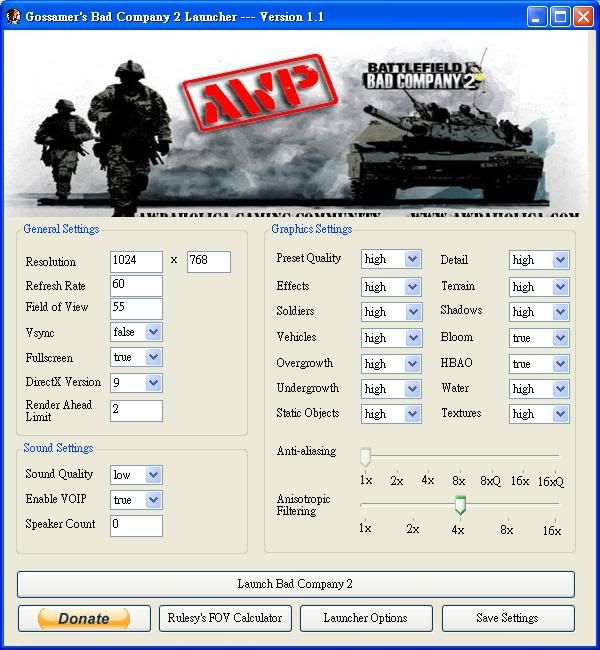
It does suck when you pay so much for a laptop and 6 months later you can't play a new game.Leave a comment:
-
Re: This is BS...
Originally posted by LunaTiK TunaLiK
Hah, trust me man, I'm the same way.
And I'm telling you - it CAN be run with good performance because it runs SP on all High with both things at the bottom on but AA and AF a 1x.
@ Zips - No, I haven't forced DX9 because the game now crashes after a while, however, I will try that right now and report back.
And yes, even though it is drastic, I am concidering a full system restore.
OK - so I ran forced DX9:
Res 1920x1200 - All High - 32 man server Rush - 20 fps, 5 when lagging.
Res 1600x1200 - All Low - 32 man Server Rush - 25-30 fps, 10 when lagging
Res 1920x1200 - All High - 16 man server Rush - 30-35 fps, 15 when lagging
But to understand this "when lagging", it means a lot. Like, I can start lagging for 30 seconds just after spawning at base with nothing around me type lag.
And so on. Forced DX9 does not seem to crash my game, but when I change the graphics settings in-game it does CTD, then black screen when choosing the game from the task bar, the force quit through Task Manager.
At least the Res was not causing lag (as much as when on DX10) - I'm sure if I go lower my fps will go up :pLeave a comment:
-
Re: This is BS...
Nothing is wrong with his system find me one person with the same cards doing better.
I guess 1x would be disabled. If you haven't yet I would surely force DX9.
You can reformat and start clean with new drivers but I can almost guarantee it's going to do nothing.
I looked at all types of benchmarks for your card when only 1 was being used and I looked at a few benchmarks of them in crossfire. I don't believe they can run this game with good performance (on nice settings)<Edit
I also do not know what type of FPS you are getting on the lower resolutions or what you consider not playable. I've noticed what some people think is smooth and good I consider pathetic and would prefer to set on a corner with a sign that read "Need money for video card" than play a game with that performance.Leave a comment:
-
Re: This is BS...
You tried forcing to run in DX9 already, right?Originally posted by groundedzero
However, reading through this thread it almost sounds like something is very amiss with your entire system. I'm almost willing to suggest you reformat the machine and start fresh without rollbacks or conflicting drivers, etc. But that's a drastic measure.Documents>BFBC2>Settings.ini
DXVersion=Auto
change Auto to 9Leave a comment:
-
Re: This is BS...
I play with AA on 1x And AF 1x. Can you get any lower?
And my system is defo not below recommended specs because Can You Run It has me near the right, far away from recommended. Or is it all lies?
And of course I did not buy the laptop JUST for BC2. I wanted a laptop, and a good one :pLeave a comment:
-
Re: This is BS...
I hate to say it but you need to turn AA off and deal with it. It would seem a single 8800GTX has no problems out performing both of your cards in some games which puts your system below recommended settings.
Your cards take a huge hit with any AA on also and they don't get much benefit from lowering the resolution. Of course a lower resolution will be better than a high one.
Did you really buy laptop in mid 2009 for BC2?Leave a comment:
-
Re: This is BS...
Yeh, that is pretty weird. I might just resore to factory settings or something and go from there. I'm in need of one of those aswell - too much crap that I don't want any more which I cba to get rid of
Oh, and Crunch, you're awesome :)Leave a comment:
-
Re: This is BS...
What I am concerned about is that you rolled back the system. The DXDiag shows you have SP1, but the OS says it has SP2, which thats not a good sign with any OS being confused about what service pack it has. You could be fighting some other issue with your system with who knows what.
I emailed you the links to the drivers for your system.
CrunchLeave a comment:
-
Re: This is BS...
No, I do not Jake - I'm not that cool. WAHEY! (ok, bad joke)
So like, I got bored of trying to find all the crap I need to update and went to play some BC2, loaded it up, connected to server, then got a white screen instead of select weapon screen, and got a "Driver failed ro respond then restarted" type error and CTD. Tried again, and this time instead of white I got a black screen and my PC froze and had to restart. This now happens everytime. I just think it's one of the side effects of what is actually wrong? But why wasn't it happening before?
All the answers I can think of are theoretical tbh :pLeave a comment:
Leave a comment: