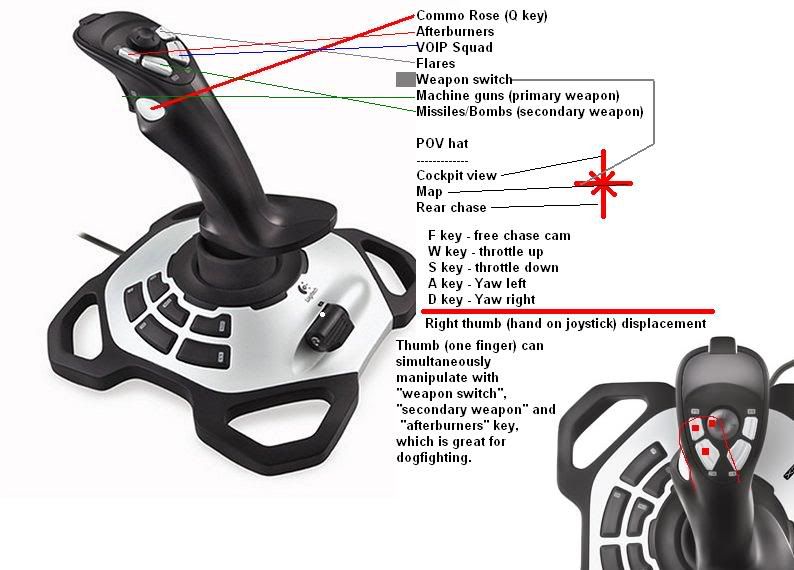
Your Joystick Button Layout

Collapse
X
 
  • Time
  • Show
Clear All
new posts
  • imported_Neptune
    Senior Member
    • Aug 2007
    • 1021

    #1

    Your Joystick Button Layout

    im interested to see other people's joystick layouts, i think mine is simple. I dont have any useful buttons on the side, there are only on the stick itself. I use my left hand for throttle and keep it on the f9-f12 keys. I recently added the map key, which is really useful. Ive tried that joy2key program but didnt really like it, I GOT IT TO WORK, just didn't find it worthy of being on my taskbar. So, if you could, post a pic of your joystick and go on paint/other program and try to map out your buttons, like i did. Also post your opinion on my/other people's layouts.

  • davelisowski

    #2
    Re: Your Joystick Button Layout

    I used this.

    I like the idea of mapping the map to the joystick. I should try that.

    Comment

    • Chris_Redfield
      Member
      • Oct 2006
      • 5986

      #3
      Re: Your Joystick Button Layout

      I find that using the 2nd button to anything important is a waste of time and attention. Mines prety different, and Ive utilized all of the hat switch keys too.

      Comment

      • Hack Saw

        #4
        Re: Your Joystick Button Layout

        Mine is heaps different, I'll post a screen shot after dinner.

        Comment

        • BlazinAngel-51

          #5
          Re: Your Joystick Button Layout


          Don't use to much on my joystick, I mostly need it for turning and shooting, the rest is with the keyboard.

          -GravityDive

          Comment

          • BirdKiller
            Member
            • Feb 2005
            • 785

            #6
            Re: Your Joystick Button Layout

            Neptune's layout is almost exactly as mine when I used the joystick for a couple of months.

            Comment

            • imported_Ph1L
              Member
              • Dec 2006
              • 1238

              #7
              Re: Your Joystick Button Layout

              Comment

              • GbeTech

                #8
                Re: Your Joystick Button Layout

                Comment

                • imported_Ph1L
                  Member
                  • Dec 2006
                  • 1238

                  #9
                  Re: Your Joystick Button Layout

                  #8

                  How do you get a "Spotted" button key on your Joystick? Always wanted it!

                  Comment

                  • signa
                    CS-Nation / TGN Staff
                    • Dec 2004
                    • 4191

                    #10
                    Re: Your Joystick Button Layout

                    Originally posted by Ph1L
                    #8

                    How do you get a "Spotted" button key on your Joystick? Always wanted it!
                    with joy2key macro program.

                    Akses VIRUS88 sebagai agen Slot88 resmi dan terpercaya 2026 dengan game gacor terbaru, proses praktis, promo harian menarik, serta layanan online 24 jam.
                    "Crunch's First Officer"
                    twitter: @signaprime

                    Comment

                    • Thirdeyez

                      #11
                      Re: Your Joystick Button Layout


                      This one works for me. Prob not best set-up but i spend so little time in the air lately it doesnt really matter.

                      You can see I use the 4 buttons around the hat-switch as my 4 views.

                      My hat switch I use as weapon slect (bombs/missles) I liked this do to old school cannon/missle fights before the patch, it was great for a flick of the thumb to switch from cannon to bombs.

                      Left hand rest on the left side of the stick, thumb of left hand for throttle, index of left on button 8 for burners and middle finger on button 7 for flares..my pinky is really close to the button I assigned for the map.

                      The basic set-up for weapon use is basic, trigger for cannons and thumb button for bombs/missles.
                      The downside of the controller for me is this thumb button. Its so set in on the stick it lacks the ability to be precise in hitting it. Sometimes I want to drop one bomb but I have to press it so hard or I get worried I wont push it hard enough I drop all my bombs...It would be easier if the button sat out of the stick more and had more of a click to it..mines feels stiff.

                      Comment

                      • imported_Ph1L
                        Member
                        • Dec 2006
                        • 1238

                        #12
                        Re: Your Joystick Button Layout

                        @ Signa

                        Thanks. But I'm ill today, so I can't understand anything of that heh. Any got it working? Easy to setup etc?

                        Comment

                        • signa
                          CS-Nation / TGN Staff
                          • Dec 2004
                          • 4191

                          #13
                          Re: Your Joystick Button Layout

                          nope, actually I dont use it.
                          "Crunch's First Officer"
                          twitter: @signaprime

                          Comment

                          • Chris_Redfield
                            Member
                            • Oct 2006
                            • 5986

                            #14
                            Re: Your Joystick Button Layout

                            Comment

                            • GbeTech

                              #15
                              Re: Your Joystick Button Layout

                              Originally posted by Ph1L
                              @ Signa

                              Thanks. But I'm ill today, so I can't understand anything of that heh. Any got it working? Easy to setup etc?
                              Here ya go:


                              btw if you're looking for a guide search at BF2S forums... They really got amazing tweaks, tips and other stuff there.

                              Tell me if you want me to post all the guides I used from BF2S.

                              Comment

                              Working...