[HELP] Power supply.

Collapse
X
 
  • Time
  • Show
Clear All
new posts
  • rombaft

    #16
    Re: [HELP] Power supply.

    Originally posted by NabilEsmail
    im sure i put power sw and reset sw in the right place, it still wont do anything.

    someone said something about turning on the psu?/??


    also maby because im trying to put a 20 pin into a 24 pin?????
    by turning on the PSU I mean you need to put the switch in the back of the PSU on

    about the 20 pin , 24 pin . Do you use an adapter going from 20pins to 24 pins and the 24 pins is sitting in your Motherboard ?? if so, this should work.
    Or did you just put a 20pin connector in the motherboard that has a 24pin connector ?? if so, the system won't start !!

    If your system does absolutely nothing, no fans spinning, nothing at all, no led is burning on the mobo, and everything is connected good, then it's or the motherboard or the PSU , not the CPU, when this one isn't working, the system will do something (fan spinning, starting to beep and stuff).

    but after reading this thread, I can profile your knowledge about building pc's a bit, and I am almost shure you just put something wrong.

    another question . when you placed the motherboard into the case, you did use the distance busses into the case I hope ?? meaning you didn't screw the motherboard directly to the case, wich would result in a motherboard touching back of case and frying the motherboard
    Comment

    • NabilEsmail

      #17
      o ****

      #1 im not using the 20 pin thingie adapter yet, though i ordered one

      i connected the motherboard directly to the case!!!! but from the screw on top i put this paper thingie washer, but on top, not on bottem

      ****

      could this be the problem?

      if so, should i just do a rma on the motherboard right now, or wait for the adapter to see if it works, and if i do the second option, should i change the motherboard right now, meaning add the bus stop thingies wut ever?

      Comment

      • rombaft

        #18
        Re: [HELP] Power supply.

        Originally posted by NabilEsmail
        o ****

        #1 im not using the 20 pin thingie adapter yet, though i ordered one

        i connected the motherboard directly to the case!!!! but from the screw on top i put this paper thingie washer, but on top, not on bottem

        ****

        could this be the problem?

        OK, you are not using the 20 to 24 adapter yet, well, my friend, this is your problem, most recent motherboard if you out a 20 pin into a 24pin motherboard, the mothrboard won't do anything (like yours )
        Once the adaper arives at your home, mount it, push power butten and your system will start.

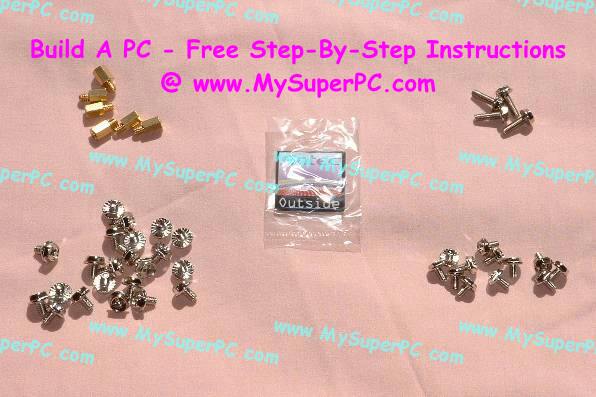
        About the mounting in the case, you need to place the mounting posts first into your case and screw the motherboard on that.
        see picture, left upper corner are the mounting posts


        if you just screwed your mtherboard directly into your PC, take it out and place those mounting posts !!!!
        Be glad you didn't had your 24pin already, because when you screw the mobo directly into the case without those mounting posts, the mobo touches the case and when powered up it shortcuts itself.

        with some cases, the mounting posts are already mounted, do you remeber if your case, where you placed the motherboard, if there where like mounting posts ? so the motherboard wasn't touching the case directly ?

        Comment

        • NabilEsmail

          #19
          Re: [HELP] Power supply.

          no i dont remember it comign with moutning post already installed, but i do ahve tjose screwes. anyways

          when i turn on the comp, like i said every 8th try, the neon lighs and ethernet light turn on for about 1/8th of a sec.

          so i think there is some power! :{

          Comment

          • NabilEsmail

            #20
            Re: [HELP] Power supply.

            hmm guys, i tried it again the comp turned on,all the fans were on and the neon lights were on. problem is....

            but besides that nothing shows on my monitor!

            the monitor is still blanked out, it hasnt beeped at all either..


            the monitor connect directly to my video card (7800 gt) cause the motherboard doesnt have a monitor slot, wtf? lol.

            do you think my video card is defective?

            Comment

            • NabilEsmail

              #21
              Re: [HELP] Power supply.

              never mind, i had to change from 214 vott, to 114v

              Comment

              • NabilEsmail

                #22
                Re: [HELP] Power supply.

                hmm, when i put windows xp cd in,

                it laods files and stuff, then eventually gets to a page.

                option 1 install xp (enter)
                option #2 repair xp
                option 3 quit i think

                and theres a hotkey for each,


                it freezes here, also im using a stat 2 hard drives, thats also backwards compatible with sata 1.

                also on the sata 2 cables, theres 2 power, and t cable port thingies right near each other, i only am using one of them, as the other has no end point that can fit in my mobo, is this ok?

                Comment

                • rombaft

                  #23
                  Re: [HELP] Power supply.

                  Originally posted by NabilEsmail
                  hmm, when i put windows xp cd in,

                  it laods files and stuff, then eventually gets to a page.

                  option 1 install xp (enter)
                  option #2 repair xp
                  option 3 quit i think

                  and theres a hotkey for each,


                  it freezes here, also im using a stat 2 hard drives, thats also backwards compatible with sata 1.

                  also on the sata 2 cables, theres 2 power, and t cable port thingies right near each other, i only am using one of them, as the other has no end point that can fit in my mobo, is this ok?
                  OMFG, we have power:)

                  you only need one power cable!! never use both on one disc.

                  about XP installation, you need to pres enter, then installation should start.
                  However, when the installation doesn't start, this means it doesn't find your HD's, wich is actualy normal because you have SATA isc's.

                  I did tell you about sata and installing windows, you need a floppy disc station, a floppy with some sata drivers (to download from mobo website or something) .

                  then insert windows CD, let it run and then you will see down on the screen the option : PRESS F6 TO LOAD DRIVERS , this is in the beginning, before windows installation .

                  press F6 and put the floppy in with the sata drivers, windows will preinstall those drivers and then it will continue installing windows on a sata disc.


                  if you don't have a floppy disc station, get one from your old pc, or buy one for like 10$ .

                  Comment

                  Working...