3500+ Overclocking

Collapse
X
 
  • Time
  • Show
Clear All
new posts
  • .Gunfire
    OT Vet.
    • Jan 2007
    • 974

    #1

    3500+ Overclocking

    Ive looked everywhere and some sites just confuse the s**t outta me but i want to overclock my AMD Athlon 64 3500+ "Venice" from a 2.19 to 2.5 or possibly 2.6 on air with a stock cooler. Is any of this possible, if so can you tell me something thats in simplest terms or are there any programs?

    (Wouldve posted in Jacky's thread but didnt want to seem to "Hijack" it)

    Specs:
    Processor: AMD Athlon(tm) 64 Processor 3500+
    Memory: 1024MB RAM
    Hard Drive: 195 GB
    Video Card: ATI RADEON XPRESS 200 Series
    Sound Card: Speakers (Realtek AC'97 Audio)
    Speakers/Headphones: Logitech Z-2300
    Operating System: Windows Vista™ Ultimate

    CPU-Z Screenie:

  • [MyIS]Dan
    MyInternetServices.com
    Support
    • Aug 2005
    • 1060

    #2
    Maybe 2.3, 2.4. AMD's dont overclock too well, and with stock cooler will run hoter.

    Comment

    • Warhawk

      #3
      Originally posted by [MyIS]Dan View Post
      Maybe 2.3, 2.4. AMD's dont overclock too well, and with stock cooler will run hoter.
      eh??? Please tell me your kidding. Amd's overclock very well! You should be able to get up to 2.6 ghz and your temperatures should not go up at all, even with the stock cooler. My cpu has seen 2.9 ghz on air so I'm sure you can hit 2.6 easy!!

      Basically you gotta start raising your bus speed which starts at 200 mhz. BUT!! when you raise your bus speed your also going to raise the frequency of the memory and the HTT (hyper transport). So, you have to set a divider on your RAM to a lower frequency, set your HTT multiplier from 5 to 4. and then you can start raising your bus speed safely. make sure your RAM does not go over the frequency it is designed to our you may see some blue screens and you could damage your ram. Also in cpu-z make sure your HTT doesn't get over 1100 mhz either.

      Here is a simple math explanation on how to determine what frequencies are running where.

      Determining HTT speed------------------------
      HTT: (bus speed)*(htt multiplier)=(Overall frequency)
      Example: (200)*(5)=(1000mhz) <----This is the default setting btw
      Example 2: (250)*(4)=(1000mhz) <----This is my setting btw


      Determining CPU speed--------------------------

      CPU: (Bus speed)*(CPU multiplier)=(Cpu Frequency)
      Notice in cpu-z, your processor has a multiplier of 11, so this is your default setting....
      (200)*(11)=2.2Ghz
      My CPU is set up exactly the same as yours with an 11 multiplier, and this is how I have it set up...

      (250)*(11)=2.76Ghz

      To figure out your RAM speed I would just check in cpu-z under the memory tab every time you boot up. Also take note that you do have the stock cooler so I would advise being careful and keeping a close eye on temperatures just in case. As long as you don't touch any voltages or anything your temperature should hardly rise at all.

      Anyway, hope this helps!!

      Comment

      • Stormy{CAN}
        Member
        • Apr 2007
        • 958

        #4
        Specs:
        Manufacturer: Gateway
        Can tell you right now, overclocking isn't going to happen. You might be able to do it with software from Windows, but it isn't going to happen with that locked gateway bios.

        Originally posted by [MyIS]Dan View Post
        Maybe 2.3, 2.4. AMD's dont overclock too well, and with stock cooler will run hoter.
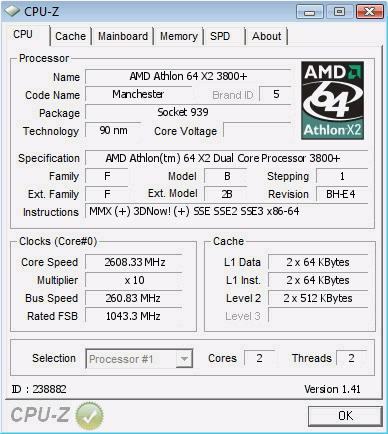
        They don't? Then why my x2 3800+ running at 2.6 Ghz,


        on default voltage even.

        Comment

        • Warhawk

          #5
          lol crap, I didn't see that manufacturer as gateway. Yeah forget it. At least I wrote a good guide haha.

          Comment

          • .Gunfire
            OT Vet.
            • Jan 2007
            • 974

            #6
            Guys dont worry its not gateway its just something xfire put there i guess

            Can anyone explain to me how this can be acheived?

            I have 2 gigs of ram and a HD3850 coming on the way and i dont want to buy a new processor so yea :)

            Comment

            • looqas

              #7
              Originally posted by Dr0matic.kush View Post
              Guys dont worry its not gateway its just something xfire put there i guess

              Can anyone explain to me how this can be acheived?

              I have 2 gigs of ram and a HD3850 coming on the way and i dont want to buy a new processor so yea :)

              Warhawk already did. Lower the HTT divider, lower the mem divider, raise the FSB (CPU) speed and observe the results.

              The important things here are HTT divider and mem divider so you'll get your machine to POST. The rest is up to you really how high you wanna take your machine.

              The HTT divider might be "hidden" in jargon so google about this and see the corresponding BIOS options of your motherboard. But believe me it's in BIOS. In AsRock mobos it's something peculiar (I can't remember the exact option name).

              Comment

              • .Gunfire
                OT Vet.
                • Jan 2007
                • 974

                #8
                alright thanks and its just a old MSI mobo

                Comment

                • Stormy{CAN}
                  Member
                  • Apr 2007
                  • 958

                  #9
                  Before you get too carried away, I hope that thing has a PCI/PCI-E lock. If not you won't be going very far because when you raise the bus spped, the PCI/PCI-E speed goes up too.

                  Comment

                  • Warhawk

                    #10
                    I've never touched a pci lock or pici-e lock. Maybe most mobos do this automatically?

                    Also, the HTT multiplier can be listed under all kinds of names like.

                    1)LDT speed
                    2)K8 to NB frequency

                    Comment

                    • looqas

                      #11
                      NB frequency sounds familiar. I had to actually change two options about it to make AsRock HTT divider to go 4x.

                      Comment

                      • Flt. Sgt. Powderhound
                        Member
                        • May 2007
                        • 962

                        #12
                        You might get some tips here:

                        Comment

                        • .Gunfire
                          OT Vet.
                          • Jan 2007
                          • 974

                          #13


                          wut does it mean rated at 3.50?

                          can i clock to that?

                          Comment

                          • Flt. Sgt. Powderhound
                            Member
                            • May 2007
                            • 962

                            #14
                            AMD used a 'Clock Speed Equivalent' rating system with their Athlon range (They've dumped it with the Phenom range), because people were getting confused as to how a 2.19GHz Athlon could beat a 3.0GHz Pentium 4. In your case, your CPU is equivalent to a 3.5GHz Pentium CPU, hence 3500+.

                            Comment

                            • .Gunfire
                              OT Vet.
                              • Jan 2007
                              • 974

                              #15
                              Originally posted by Flt. Sgt. Powderhound View Post
                              AMD used a 'Clock Speed Equivalent' rating system with their Athlon range (They've dumped it with the Phenom range), because people were getting confused as to how a 2.19GHz Athlon could beat a 3.0GHz Pentium 4. In your case, your CPU is equivalent to a 3.5GHz Pentium CPU, hence 3500+.
                              thanks for the explanation man

                              much appreciated

                              Comment

                              Working...