Only the default (TGN Light) theme for now. Dark them is also coming back soon. Then CSN. Then Wrestlin' Nation. A lot of WIP stuff right now. There are a couple of things still not working either. Sorry.
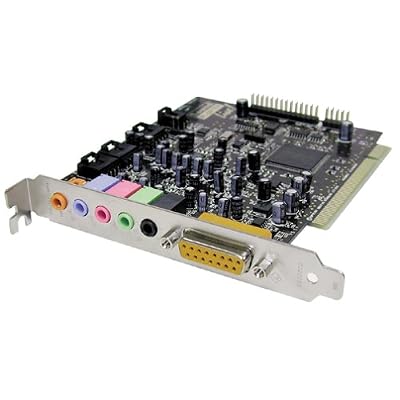
The problem is that the mobo only has the 3 analog inputs, no digital coaxial or digital optical input at all.
What this means is you will only be able to use the Logitech system in analog mode.
Analog mode(the 3 colored jacks) is correct for GAMING/EAX, but 2nd choice for watching movies, which you use either the optical or coax cable for and get the display to say DIGITAL or DTS.
If you do not plan to watch movies, then don't bother with a sound card...just try it out first.
If you do watch movies...try it out first anyway, you can always order the card a few days later.
.
.
.
I'm using my z5500's with onboard sound, though my mobo has both optical and coax inputs. I use the 3 colored 3.5mm minijacks for EAX/GAMING, and the digi coax(personal choice over optical, no real benefit, they work the same) for movies...sounds great!
As someone pointed out, onboard sound is NOT crap anymore, and I'm not even using the latest Realtek HD that is out now and I still love mine.
All you need to do with onboard is find a good driver for it, the original driver that comes with the mobo generally isn't the one you use.
ok thanks man. im getting the speakers for gaming and music on my itunes. not necessarily for movies. will itunes still work with onboard sound? And what site do you guys recommend for me to get the z5500 at a reasonable price? Not newegg because they are sold out. Any other websites out there?
Itunes music is only stereo anyhow, right? As long as you have the front channels and sub hooked up, music will sound fine. For movies and games that support 5.1 audio you'll have to hook up the rear speakers. The main downside I see to using the onboard for 5.1 is that it takes up your mic port. You won't be able to use TS or ingame VoIP.
rotfl look at the shipping date, you dont wanna buy from there
Originally posted by jimtool655321
Itunes music is only stereo anyhow, right? As long as you have the front channels and sub hooked up, music will sound fine. For movies and games that support 5.1 audio you'll have to hook up the rear speakers. The main downside I see to using the onboard for 5.1 is that it takes up your mic port. You won't be able to use TS or ingame VoIP.
If you have sound inputs on the front you could, couldnt you?
rotfl look at the shipping date, you dont wanna buy from there
If you have sound inputs on the front you could, couldnt you?
The jumpers for the sound inputs are usually connected to the same chip/circuit as the jacks in the back. The ports on the front end up having the same functionality as the ones in the back when you make changes to your configuration.
i dont think im gonna make any changes.......just get the speakers and plug em in. unless i have to configure?
I just ordered logitech Z-5300e........seem decent....i am planning on putting them in the right 5.1 configuration but then i realized that the wires are gonna be too short......the fronts and the center speaker are only 6' of wire.....where i need 20' and the rears have 12' as i need 30'.......can somedoy do me a huge favor and find me wires that i can plug into the existing wires of the speakers and plug that into the sub? or where the plug is suppossed to go.....lol. please use newegg.com i cant go to the store mostly cause its far and they are still cleaning the streets from new years.
thanks in advance.
For movies and games that support 5.1 audio you'll have to hook up the rear speakers. The main downside I see to using the onboard for 5.1 is that it takes up your mic port. You won't be able to use TS or ingame VoIP.
What ancient mobo are you using? Sounds like one that isn't 5.1
Mine(a cheap MSI K8N neo4-F), has five 3.5mm jacks in the back. The MIC(pink) is NOT used by the 6 channel inputs(green, orange, black).
What ancient mobo are you using? Sounds like one that isn't 5.1
Mine(a cheap MSI K8N neo4-F), has five 3.5mm jacks in the back. The MIC(pink) is NOT used by the 6 channel inputs(green, orange, black).
I don't have this problem. My mobo has decent sound but I turned it off and now use an X-fi card. I'm just trying to help this guy, who does seem to use a somewhat lower end board. We make do with what we have.
Right, but I think you are mistaken in your advice then. As far as I know, all 5.1 cards or mobos will NOT force you to use the MIC input as part of the speaker setup. It is totally separate.
This should only occur on mobos that are not 5.1 channel, i.e.: 2 channel only. I too am trying to help this guy...
Right, but I think you are mistaken in your advice then. As far as I know, all 5.1 cards or mobos will NOT force you to use the MIC input as part of the speaker setup. It is totally separate.
This should only occur on mobos that are not 5.1 channel, i.e.: 2 channel only. I too am trying to help this guy...
I DID have a POS HP comp that used this configuration, though. It only had three jacks on the back, but it said on the box that it had 6 channel sound. I found the manual for the motherboard used in the comp and figured out how to configure it to run 5.1 sound. The things I have said about giving up inputs and the like come from experience in using sub-standard gear. Why do you think I spent as much as I did on an awesome sound card? I never wanted to compromise again with my sound. I have "made do" with utter crap and tried to think it was nice, then I saved enough to spend a month's pay on a damn good comp, at the time I built it.
ALL of the jacks go to the same DSP, it can assign them however you tell it to. If the manual tells you to hook the front to the green, the rear to the blue, and the sub to the pink, then that is how you get 5.1 out of it. Period. The website didn't have the complete manual so I didn't get it there. If you want to find out how to rig your $hit so you can get 5.1 sound out of those speakers without buying a new card, google is your friend. Find a full manual for that card and get cracking. You may even be able to fart around in your advanced audio settings and get the general idea.
I DID have a POS HP comp that used this configuration, though. It only had three jacks on the back, but it said on the box that it had 6 channel sound.
You know what? After going back and looking at the link for his mobo...it shows only 3 jacks :)
We process personal data about users of our site, through the use of cookies and other technologies, to deliver our services, personalize advertising, and to analyze site activity. We may share certain information about our users with our advertising and analytics partners. For additional details, refer to our Privacy Policy.
By clicking "I AGREE" below, you agree to our Privacy Policy and our personal data processing and cookie practices as described therein. You also acknowledge that this forum may be hosted outside your country and you consent to the collection, storage, and processing of your data in the country where this forum is hosted.
Comment