Solution to the game crash reboot problem?

Collapse
X
 
  • Time
  • Show
Clear All
new posts
  • tellysurv

    #31
    It's definitely the game- either server related or punkbuster related as it only happens in multiplayer and on ranked pb enabled servers. I have tried everything possible except for buying a whole new PC (yeah right!). I can player forever in single player and on non ranked/pb servers with no problems, but as soon as I join a ranked game and try to select a kit and join a squad, BAM, I get the looping sound and BSOD with a stop error. Searched all over for the stop error and do not get much info. Funny thing is, I could play with no problems for two to three weeks after the game came out and all of a sudden, it doesnt work anymore...sucks...

    Intel P4 3.0 Ghz
    Intel D875PBZ Mobo (with all latest drivers from Intel website)
    OCZ 520W PSU
    eVga GeForce FX 5950 Ultra 256mb VGA w/Zalman Cooler (77.77 Drivers)
    2gb Crucial RAM
    Turtle Beach Catalina 7.1 Sound
    2 x 160gb HDD
    Asus CD-ROM
    Iomega SuperDVD- DVD/CD RW

    Comment

    • =PxR=TitanSound

      #32
      Well I posted on the 1st page of this thread saying the 77.77 drivers worked.....they did....for about a day!

      Its getting like you now Josh. 8 times it rebooted last night. Sometimes After 5/10 mins, sometimes after being in the game for all of 30 seconds. Its getting very very very frustrating now

      Comment

      • =PxR=TitanSound

        #33
        Re: Solution to the game crash reboot problem?

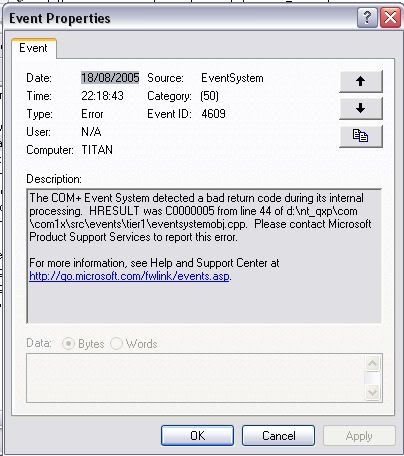
        Checked my event log and this is what came up:


        I have no idea what this means so any help is greatly appreciated

        Comment

        • SerbSniper1

          #34
          Re: Solution to the game crash reboot problem?

          Where do you go to get this event log info?

          Comment

          • =PxR=TitanSound

            #35
            Re: Solution to the game crash reboot problem?

            Right click on my computer, manage, event viewer then application or system :)

            Comment

            • J()sh

              #36
              Re: Solution to the game crash reboot problem?

              this is what i get when i get a blue screen crash
              Error code 100000ea, parameter1 85bbc7a0, parameter2 85b54360, parameter3 862c2740, parameter4 00000001.

              Comment

              • |CBW|Hellbound

                #37
                Re: Solution to the game crash reboot problem?

                I have been reading through these trying to solve the same problem.
                It crashes the system completely. No BSOD, just a reboot.
                About the only thing anyone says is "update your drivers". (Mind you, the help here is much favourable than what EA has to offer on their site. And that is a compliment to all who put their 2 cents in!)
                I have updated drivers. I have cleaned drivers. I have updated BIOS. I have removed and reinstalled drivers. I have removed and reinstalled BF2.
                If it is in my box, it is updated.
                Unfortunately, this game refuses to cooperate.
                Crash.
                Crashes some more.

                And wait for the next patch? When? Next week? Next month? Next year?
                This ain't Valve remember? This is EA.

                Comment

                • SerbSniper1

                  #38
                  Re: Solution to the game crash reboot problem?

                  It was found to be my IOMEGA ZIP drive, deleted the driver and no more blue screen crashes. Weird that it would be that.

                  Comment

                  • |CBW|Hellbound

                    #39
                    Re: Solution to the game crash reboot problem?

                    Not for me. IOMEGA is now off my system.
                    It actually crashed quicker this time. Less than a minute.

                    Comment

                    • SerbSniper1

                      #40
                      Re: Solution to the game crash reboot problem?

                      Read my post, {new blue screen error fix} there is a file in system 32 in the iomega folder that must be deleted. It may still be there.

                      Comment

                      • J()sh

                        #41
                        Re: Solution to the game crash reboot problem?

                        My game now crashes less than a minute after I load.

                        Comment

                        • SerbSniper1

                          #42
                          Re: Solution to the game crash reboot problem?

                          Do you send the reports to microsoft when it crashes? Try that and see what comes back. If its a driver or ????

                          Do you have any iomega programs or flash card readers?

                          Comment

                          • J()sh

                            #43
                            Re: Solution to the game crash reboot problem?

                            no iomega products.


                            i'm getting a replacement motherboard, hopefully that will fix it. until then, no playing time.

                            Comment

                            • imported_bosx2

                              #44
                              Re: Solution to the game crash reboot problem?

                              Originally posted by J()sh
                              no iomega products.


                              i'm getting a replacement motherboard, hopefully that will fix it. until then, no playing time.
                              do you really think a new mobo will fix it? its something software related because too many people have these problems.

                              Comment

                              • SerbSniper1

                                #45
                                Re: Solution to the game crash reboot problem?

                                PUNKBUSTER/BF2 is having a problem with 1 driver, thats it. Till you find it, nothing will fix it.

                                Comment

                                Working...