Opening ports.

Collapse
X
 
  • Time
  • Show
Clear All
new posts
  • imported_Buzzsaw

    #1

    Opening ports.

    Ok, so I keep getting the Connection problems as soon as I join a server...so I check out EA's support website, and it tells me to open a load of 'ports', TCP and UTP (i won't even pretend to know what these mean).

    But I am not sure how to do it, or on which compupter to do it. I have this PC in my bedroom which is connected by wireless to a Belkin Wireless router downstairs, which is also connected to another PC (by cable, not wireless).

    I tried having a go on my computer, by going to the Windows firewall settings and 'Add port' to which I did a number of times, calling them BF2(1), BF2(2), etc. This did not work. Do i have to call them a specific name? Am I doing this on the wrong computer?

    Any help greatly apprieciated.

    Buzz.
  • Scinto
    Retired TGN *****
    • Mar 2006
    • 5387

    #2
    Re: Opening ports.

    you open the ports on your router through its configuration tool as thats your connection to the internet, to get into the routers controls type 192.168.1.1
    in a IE or Firefox default username/pass is admin/admin should a be a section to do with ports in there,

    make sure Punkbuster is updated

    and lastly if your playing wireless add 128bit Wep encryption it should improve the stability of your connetion

    (i play on wireless too :) )

    Comment

    • imported_Buzzsaw

      #3
      Re: Opening ports.

      Well i put that IP address into IE and it didn't work...
      Hmm.

      Comment

      • Scinto
        Retired TGN *****
        • Mar 2006
        • 5387

        #4
        Re: Opening ports.

        do you know the model of the router?

        Comment

        • imported_Buzzsaw

          #5
          Re: Opening ports.

          Yes, it is a Belkin ADSL Modem Wireless G router.

          Comment

          • Eden

            #6
            Re: Opening ports.

            You dont need to open any ports to play BF2. You only need to open ports if you are running a server on your computer.

            if you getting connection problems, defrag your computer, update PB, update all your drivers and try other servers as well.

            Comment

            • urwathrtz
              Member
              • Jul 2007
              • 53

              #7
              Re: Opening ports.

              This is exactily what is happening to me. humm thanks for the info.

              Originally posted by Buzzsaw
              Ok, so I keep getting the Connection problems as soon as I join a server...so I check out EA's support website, and it tells me to open a load of 'ports', TCP and UTP (i won't even pretend to know what these mean).

              But I am not sure how to do it, or on which compupter to do it. I have this PC in my bedroom which is connected by wireless to a Belkin Wireless router downstairs, which is also connected to another PC (by cable, not wireless).

              I tried having a go on my computer, by going to the Windows firewall settings and 'Add port' to which I did a number of times, calling them BF2(1), BF2(2), etc. This did not work. Do i have to call them a specific name? Am I doing this on the wrong computer?

              Any help greatly apprieciated.

              Buzz.
              Yeah this whole "open port" stuff thier saying might of well been written in Chinese , I don't get it. Got this note from EA this morning :

              Thank you for contacting Electronic Arts. I’m sorry for the difficulty that you are having with Special Forces. Were you able to patch the game again after installing Special Forces? Can you give me the exact error message you're getting? Were you able to verify with your ISP if the ports are open?

              These ports need to be open because these are the channels in which game information from your computer will reach the server and vice-versa. If the ports are closed, you won't be able to connect to the game server.

              In order to best troubleshoot your issue, I'm going to need some more system information. Can you send me the information from a program called dxdiag.exe. To do this:

              · Go to Start -> Run.
              · In the box, type the following: dxdiag
              · Click "OK"
              · Click the "Save All Information" button on the first screen of the application.
              · Then on top of the "Save As" box that pops up, select Desktop (if it's not set to save there already), then click Save.
              · Finally, attach the dxdiag.txt to your email reply.

              After we receive this file we can continue troubleshooting the issues at hand and hopefully come to a solution.

              Meanwhile please make sure that you have closed any programs or tasks running in the background as sometimes one of the programs can conflict with the game. Background applications such as anti-virus programs are often the cause of conflicts.


              Should you require further assistance about this or any Electronic Arts games in the future please visit our website and review our extensive Self Help knowledgebase (http://support.ea.com)

              Paolo R.
              EA Technical Support

              - I'll have to do it when I get home. Wish me luck!

              Comment

              • Cigar_Man

                #8
                Re: Opening ports.

                Originally posted by Buzzsaw
                Ok, so I keep getting the Connection problems as soon as I join a server...so I check out EA's support website, and it tells me to open a load of 'ports', TCP and UTP (i won't even pretend to know what these mean).

                But I am not sure how to do it, or on which compupter to do it. I have this PC in my bedroom which is connected by wireless to a Belkin Wireless router downstairs, which is also connected to another PC (by cable, not wireless).

                I tried having a go on my computer, by going to the Windows firewall settings and 'Add port' to which I did a number of times, calling them BF2(1), BF2(2), etc. This did not work. Do i have to call them a specific name? Am I doing this on the wrong computer?

                Any help greatly apprieciated.

                Buzz.
                Since you are behind a Belkin router, you may want to go ahead and try disabling your Windows Firewall to see if you can connect to a BF2 server that way.

                If you can, then Windows firewall is your problem.

                If you cannot, then it is something with your networking.

                Also, make sure you do not have any other firewalls running, like Norton\McAfee\ZoneAlarm, etc., on your computer.

                Being behind the router, you are already protected from incoming probes from the internet. The only benifit of having the WinFirewall (or any software firewall) running at this point, is to protect your computer from others connected on your LAN.

                Comment

                • urwathrtz
                  Member
                  • Jul 2007
                  • 53

                  #9
                  Re: Opening ports.

                  Originally posted by Cigar_Man
                  Since you are behind a Belkin router, you may want to go ahead and try disabling your Windows Firewall to see if you can connect to a BF2 server that way.

                  If you can, then Windows firewall is your problem.

                  If you cannot, then it is something with your networking.

                  Also, make sure you do not have any other firewalls running, like Norton\McAfee\ZoneAlarm, etc., on your computer.

                  Being behind the router, you are already protected from incoming probes from the internet. The only benifit of having the WinFirewall (or any software firewall) running at this point, is to protect your computer from others connected on your LAN.
                  I have all that stuff off and still can't connect. EA Downloader, Punkbuster, gamespy arcade..nothing could not connect to any of it. EA have been very good helping me to figure this out. ANYBODY HAVE ANY SUGGESTIONS?!?!?! please?

                  Comment

                  • Eden

                    #10
                    Re: Opening ports.

                    You need to give us more information, simply saying your getting connection problems doesn't tell anyone anything.

                    Comment

                    • Cigar_Man

                      #11
                      Re: Opening ports.

                      Open the task manager, select the Processes tab. Open the box big enough to show all of the running tasks and take a screenshot of it. Paste that into Paint and save it as a jpg file. Then post it up so we can see what is running.

                      Comment

                      • Lazza66

                        #12
                        Re: Opening ports.

                        You said you can connect, so open / closed ports isn't the problem.

                        Firstly you need to establish if the problem is inside or outside your network.

                        Download and install this program...
                        MajorGeeks offers only 4-star or better geek-tested and reviewed software for Windows along with tutorials and videos when you need help with your computer.


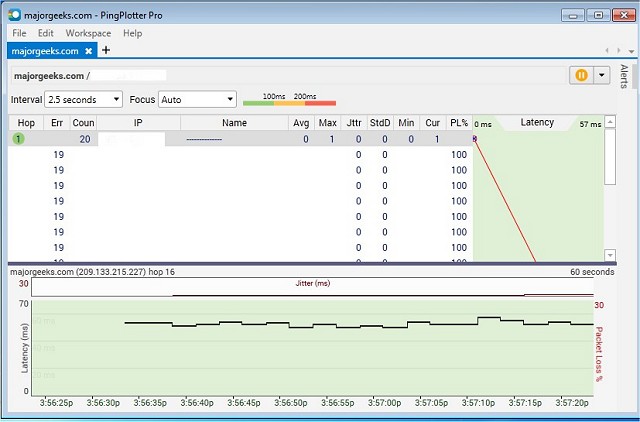
                        Run Pingplotter and put the i.p. address of a BF2 server into the address box, then set...

                        # of times to trace to "Unlimited"
                        Trace Delay to "1 second"
                        Samples to include to "Unlimited

                        Then choose start, and let it run for a minute or 2. If there are errors (Err) and packet loss (PL%) at hop 1 then the problem is inside your network.

                        If the errors and packet loss are at hop 2 or greater then the problem is at that location and is not a problem on your network.

                        Comment

                        • rageh@mmer

                          #13
                          Re: Opening ports.

                          I have the exact same problem. I have a case open with EA, but so far they havn't been able to fix.

                          So far I have reinstalled several times, once as a "super" clean with registry deletes for the ea stuff and folder deletes for every file BF2 drops in incl. profile folder, put my host in my Linksys DMZ (allow all ports), disabled McAffee FW, disabled McAffee VS, updated PB, Updated Video drivers, Checked DirectX, ram Memtest overnight, defragged drive with DK10. Tried to run game as another admin user but get "CD-Key is invalid", which I guess is normal for BF2.

                          This machine was working until I installed AF and EF via EA Downloader, ever since then can't get online, regardless of whether I wipe and do or do not install AF or EF. I have the Deluxe edition with SF built in. The host is AMD 3700,2GB, 200GB/150GB Free/EVGA 7600GS, XP MCE w/sp2. Fully patched. Real edition of BF2, no license tricks employed. DirectX diag says everything is fine. Not overclocked. I even tried the 1.4 Beta patch, same thing. Tried through BF2 alone, through SF online start, and through GameSpy.

                          I'm beginning to wonder if either a recent MS patch, EA Downloader update, or something GameSpy put on is causing the issue. Those are the only major software components that I have upgraded.

                          Any help appreciated.

                          Comment

                          • urwathrtz
                            Member
                            • Jul 2007
                            • 53

                            #14
                            Re: Opening ports.

                            Originally posted by Lazza66
                            You said you can connect, so open / closed ports isn't the problem.

                            Firstly you need to establish if the problem is inside or outside your network.

                            Download and install this program...
                            MajorGeeks offers only 4-star or better geek-tested and reviewed software for Windows along with tutorials and videos when you need help with your computer.


                            Run Pingplotter and put the i.p. address of a BF2 server into the address box, then set...

                            # of times to trace to "Unlimited"
                            Trace Delay to "1 second"
                            Samples to include to "Unlimited

                            Then choose start, and let it run for a minute or 2. If there are errors (Err) and packet loss (PL%) at hop 1 then the problem is inside your network.

                            If the errors and packet loss are at hop 2 or greater then the problem is at that location and is not a problem on your network.
                            OK so I downloaded the Ping Plotter and traced to a BF2 server and get :

                            Socket error #10061 : Connection refused

                            What the heck is that? I also traced to punkbuster.com and get the same thing. Kinda odd that his only game I have ever had a problem with. Thanks for the help.

                            Comment

                            • Lazza66

                              #15
                              Re: Opening ports.

                              Originally posted by urwathrtz
                              OK so I downloaded the Ping Plotter and traced to a BF2 server and get :

                              Socket error #10061 : Connection refused

                              What the heck is that? I also traced to punkbuster.com and get the same thing. Kinda odd that his only game I have ever had a problem with. Thanks for the help.
                              That could be a problem on your pc where pingplotter can't access the port. You should repair your tcp/ip stack with this utility and try again...


                              Some servers don't support ping, if they don't you should still see their name resolved to an i.p. address, but you will get 100% packet loss.

                              Comment

                              Working...