video card woes

Collapse
X
 
  • Time
  • Show
Clear All
new posts
  • rev316

    #1

    video card woes

    It seems this night was full of fun.

    I left a game on my computer, came back, and it was dead. So, naturally I thought it was my power supply. Later to my findings, my old 5200 card was working fine. However, my 6800 wasnt the case.

    I got my troubleshooting down to this.

    Whenever I plug my power-supply cable to my video card, it would shut off the machine. Then I would need to disconnect/reconnect the main motherboard cable to get it to work again.

    If I left my power-supply cable to my video card un-connected. My video card would still turn on (fans spin'n) but it would give out the loud annoying warning beep. Then of course, my computer monitor wouldnt show anything also.

    So, my question to all you PC gurus...

    Why the hell does it do this? Lack of voltage? Burned out?

    *I did have my video card overclock'd a tad. Although, I had been using it for a couple months now with no problems. Odd to me that this is occuring now.

    Heres my second question,

    Looks like I F'd up my card. Although I do have a "certificate of coverage" that was purchused for an extra 30 bucks. How do I get my refund?

    Apollo 6800 through Newegg.

    And heres my last question....

    Now that I have 170 bucks (hopefully back to me through refunding) what card should I get? Something with a bit more "umpf".

    Machine Specs:
    Giga AMD 2500+
    1 gig ram

    Thanks!

    (p.s. thank you Oz)
  • Talus
    Member
    • Oct 2006
    • 6854

    #2
    Re: video card woes

    Test that card in another machine...

    ..and test another card in your machine.

    Is it a bad PSU or is it the video card?

    Comment

    • rev316

      #3
      Re: video card woes

      I dont have another PC to test my 6800 on.

      But my old 5200 works fine.

      Im not sure what a PSU is or how to tell if its bad?

      Comment

      • sackynut

        #4
        Re: video card woes

        in the event that it doesnt work just get another 6800.

        Comment

        • redearedslider

          #5
          Re: video card woes

          Originally posted by sackynut
          in the event that it doesnt work just get another 6800.
          lol that's evil :P

          Comment

          • -[MDS]-Stormy

            #6
            Re: video card woes

            Originally posted by rev316
            Im not sure what a PSU is or how to tell if its bad?
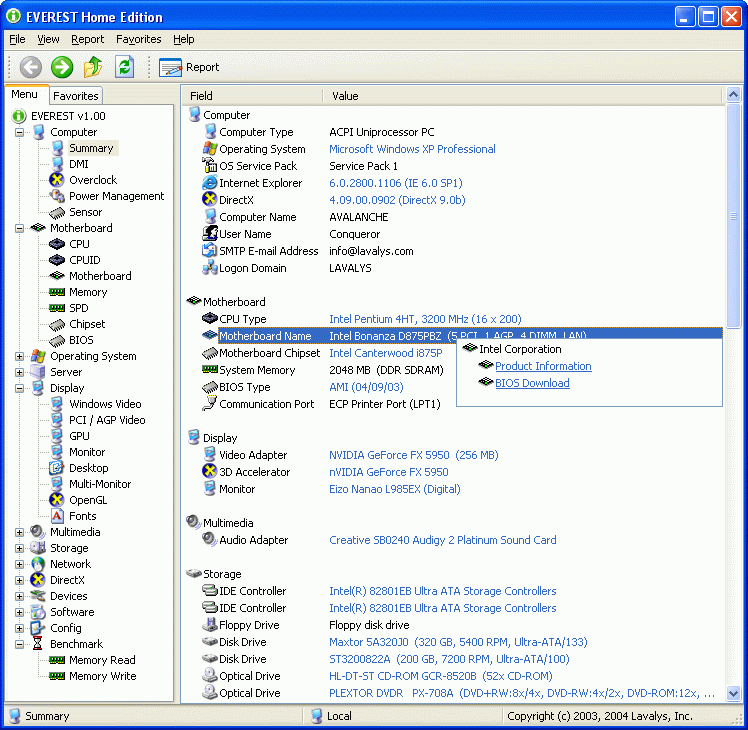
            PSU=power supply. And from what you're describing it sounds like yours may be crapping out. If you don't have anything to check the voltages with grab this,

            EVEREST Home Edition is a freeware system information, system diagnostics and benchmarking solution for home PC users, based on the award-winning EVEREST Technology....


            After it is installed click on Computer-Sensor and post back what it lists for the voltages.

            Comment

            • Hephaistion

              #7
              Re: video card woes

              It sounds like the PSU, what is the brand and wattage?

              Comment

              • Talus
                Member
                • Oct 2006
                • 6854

                #8
                Re: video card woes

                Exactly..replacing a Power Supply Unit will be cheaper than replacing a video card.

                Comment

                • Hephaistion

                  #9
                  Re: video card woes


                  This might help.
                  Rule of thumb, don't just look at the peak wattage on a PSU when buying, read reviews, shop around. I have a monster PSU, but I plan on keeping my PSU until ATX 2.0 is dead. (http://www.zipzoomfly.com/jsp/Produc...ffiliate=yahoo)
                  Here is another great PSU: http://www.endpcnoise.com/cgi-bin/e/NX-5000.html
                  Almost $120, but soo worth it, probably better than mine, since mine is almost 8" long, harder to get into most cases, in fact I had to remove the bottom fan from my case when I got my Antec P180.

                  Comment

                  • rev316

                    #10
                    Re: video card woes

                    Seems it was a voltage spike.....

                    Alteast thats what my techy friend was guessing..

                    anyway to know for sure?

                    Comment

                    • -[MDS]-Stormy

                      #11
                      Re: video card woes

                      Let me repeat myself,

                      If you don't have anything to check the voltages with grab this,

                      http://www.majorgeeks.com/EVEREST_Fr...ion_d4181.html

                      After it is installed click on Computer-Sensor and post back what it lists for the voltages.

                      Comment

                      • rev316

                        #12
                        Re: video card woes

                        Oh man,

                        Im sorry Storm. Im in the stage of being so ****ed about my vid card, that im not even reading the threads I created.

                        Here's what it gave me!


                        Sensor Properties:


                        Sensor Type ITE IT8705F (ISA 290h)


                        Motherboard Name Gigabyte 7VT600 Series

                        Temperatures:


                        Motherboard 35 °C (95 °F)


                        CPU 45 °C (113 °F)


                        Aux 28 °C (82 °F)

                        Cooling Fans:


                        CPU 3924 RPM


                        Chassis 2192 RPM

                        Voltage Values:


                        CPU Core 1.71 V


                        +3.3 V 3.31 V


                        +5 V 4.81 V


                        +12 V 12.16 V


                        +5 V Standby 4.92 V


                        DIMM VTT 1.33 V


                        Debug Info F 2B 4D FF


                        Debug Info T 35 28 45


                        Debug Info V 6B 53 CF B3 BE 9F 9F (77)

                        Comment

                        • -[MDS]-Stormy

                          #13
                          Re: video card woes

                          I assume those numbers are with the 5200 in. The 12V looks OK, but the 5 and 3.3V are reading a little low (but not too much). Ideally if anything you want them to be a little bit on the high side (no more than +5%). If they are reading low then when you start to put any draw on the psu the voltages can drop causing instability.

                          If you can try the card in a friends computer to see if it is the card that is the problem, or if it is your power supply that can't handle the card anymore. If the card does the same thing in another comuter, then it is time to contact Newegg about an RMA. If the card works, then it is time to look for a new power supply.

                          Comment

                          • rev316

                            #14
                            Re: video card woes

                            I cant access another PC around here. (Mainly mac lovers here)

                            Already got newegg replacing it,im just in fear of blowing another card?

                            Comment

                            • squeak

                              #15
                              Re: video card woes

                              Originally posted by redearedslider
                              lol that's evil :P
                              I agree.. lol

                              I have a Nivia GeForce FX 5200, runs perfectly on low :cry:

                              lol

                              Comment

                              Working...