Building a Gaming Rig

Collapse
X
 
  • Time
  • Show
Clear All
new posts
  • Apalis
    Member
    • Apr 2008
    • 55

    #1

    Building a Gaming Rig

    I had a thread going about a possible gaming laptop but then decided to build a rig. So they said just make a new thread and I shall get some input. I came about these parts with a friend whos a little more hardware oriented with me so lets see what you guys have to add and critique xD

    Basically the budget is $1,000 or as close as possible and give me beautiful gaming performance, though i am flexible depending on what it is. Also i want it to be easily built upon in the future. So here is what i have:


    Intel Core 2 Duo E8400 Wolfdale 3.0GHz LGA 775 65W Dual-Core Processor Model BX80570E8400 - Retail - $169.99

    ASUS P5Q LGA 775 Intel P45 ATX Intel Motherboard - Retail - $129.99

    mushkin XP 4GB ASCENT w/ eVCI technology (2 x 2GB) 240-Pin DDR2 SDRAM DDR2 1066 (PC2 8500) Dual Channel Kit Desktop Memory Model 996619 - Retail - $139.99 w/ out $20 MIR

    EVGA 512-P3-N978-AR GeForce 9800 GT AKIMBO 512MB 256-bit GDDR3 PCI Express 2.0 x16 HDCP Ready SLI Supported Video Card - Retail - $154.99 w/ out $10 MIR

    OCZ GameXStream OCZ600GXSSLI 600W ATX12V SLI Certified CrossFire Ready Active PFC Power Supply - Retail - $99.99 w/ out $30 MIR

    Western Digital Caviar SE16 WD2500AAKS 250GB 7200 RPM SATA 3.0Gb/s Hard Drive - OEM - $59.99

    ASUS 20X DVD±R DVD Burner with LightScribe Black SATA Model DRW-2014L1T - Retail - $39.99

    Microsoft Windows Vista Home Premium SP1 64-bit English for System Builders 1pk DSP OEI DVD - OEM - $99.99

    COOLER MASTER RC-690-KKN1-GP Black SECC/ ABS ATX Mid Tower Computer Case - $84.99

    Edit: Totals to about $980

    If any body has any ideas as to what can be done differently or better please post. Also what is "OEM", i noticed on my disc drive and my copy of vista. Should the ram be changed, i really only chose the mushkin because it had no bad reviews and comes with 3d mark vantage. So, please critique xD.
  • Vash2051

    #2
    Re: Building a Gaming Rig

    OEM basically means it comes with just the part, no manuals, driver cds, cables, etc. Also you might want to look into a decent aftermarket cooler. If your looking for extending your rigs performance window OCing your processor is always a good option.

    Comment

    • Apalis
      Member
      • Apr 2008
      • 55

      #3
      Re: Building a Gaming Rig

      I did completely forget about an after market cooler. Hmm, does anybody have any experience with any good ones? Im a little freaked out about the heavy cooler just sitting on air and relying entirely on the mobo for support. Also, Should I order a tube of artic silver or stuff that comes with the processor is plenty enough?

      Comment

      • AvalancheDiode
        Need more squeezing
        • Jan 2007
        • 988

        #4
        Re: Building a Gaming Rig

        OEM on Vista means you can either use it for your own, or transfer license to another person with the computer you built. If you transfer the OEM copy, then you have to provide service to dude who bought your computer. If you use if for your own, then you can contact M$ and ask them to solve your problem, since you "sold" yourself a computer. The OEM copy stick with motherboard, and if you change the motherboard, you have to call M$ to get the stuff activated. There is nothing wrong with it.

        OEM CPU comes with the CPU only. If the CPU is defective, both Intel and AMD won't allow direct return from end users. So if you are unlucky enough to get the bad one, then you have to get the thing return through newegg. Personally, I wouldn't suggest you buy OEM CPU, and especially not AMD's OEM parts. The price of AMD's OEM parts are currently more expensive than box retail version, which make the purchase nonsense unless you are planning to build hundreds and sell them.

        Same thing with OEM DVD-RW, but they are so dirt cheap right now, to the degree that nobody cares.

        As long as you don't do overclock, you don't need an after market cooler. There are two reasons that you might need to get better HSF: 1. overclock 2. noise control. As for weight, I haven't heard of anybody had their HSF tore apart their motherboard.


        another edit:

        BTW, I would suggest that you go with slower DDR2-800 to save about $50, so that you can get a 4850 instead of 9800GT.

        Comment

        • Eagle101

          #5
          Re: Building a Gaming Rig

          That looks gamer certified to me go with it, you got my vote!

          If possible, try aiming for an HD4850 at the very least. Neways you can still upgrade from that card in the future.

          Comment

          • Apalis
            Member
            • Apr 2008
            • 55

            #6
            Re: Building a Gaming Rig

            Any direct links? I get so overwhelmed looking at vid cards because there are so many and the differences can be so minute. If i did go with a different and better (?) GPU what would be the cost increase to performance increase ratio?

            Also I think i would like an aftermarket heatsink and fan for noise lowering alone. So still, any recomendations from personal experiences?

            Comment

            • =98=
              Member
              • Oct 2006
              • 10299

              #7
              Re: Building a Gaming Rig

              Just look up Radeon HD4850 or HD4870 (the latter is more expensive but better)

              Comment

              • Apalis
                Member
                • Apr 2008
                • 55

                #8
                Re: Building a Gaming Rig

                Is there any benefit to going to a Radeon HD4850 over boosting mine to a 9800 gtx or is it just a matter of prefrence? just wanna thank you all for the help I'm a hardware nub.

                Comment

                • Wizrdwarts
                  Member
                  • Dec 2006
                  • 3754

                  #9
                  Re: Building a Gaming Rig

                  4850 is the same performance as the 9800GTX iirc.

                  2 good quick GPU references:
                  We've run hundreds of GPU benchmarks on Nvidia, AMD, and Intel graphics cards and ranked them in our comprehensive hierarchy.


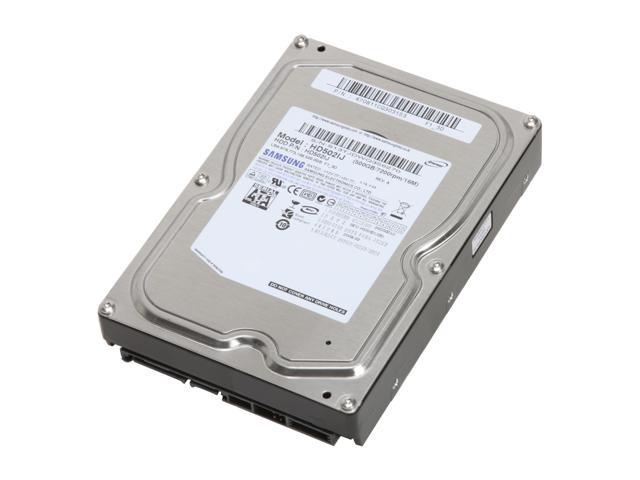
                  And a $10 upgrade to your hard drive will get you 500gb. :)
                  Buy SAMSUNG Spinpoint F1 HD502lJ 500GB 7200 RPM 16MB Cache SATA 3.0Gb/s 3.5" Hard Drive Bare Drive with fast shipping and top-rated customer service. Once you know, you Newegg!

                  Comment

                  • AvalancheDiode
                    Need more squeezing
                    • Jan 2007
                    • 988

                    #10
                    Re: Building a Gaming Rig

                    There is currently a Asus 9800GTX+ open box for $149, if you dare buy open box.

                    Generally speaking, you are not using an NVIDIA board, so 4850 will be better for you in the long run. Just slide in another 4850 and you have a crossfire that out-perform GTX280 in certain cases.

                    Though I still find no reason to upgrade from my 3870, the price of graphics cards now is really tempting.

                    Comment

                    • Apalis
                      Member
                      • Apr 2008
                      • 55

                      #11
                      Re: Building a Gaming Rig

                      The only thing I'm not comfortable with on the Radeon HD4850's is that they all seem to be single slot with allot of reviews saying they run hot ... I really dont wanna run into any heating issues so im not sure im sold on that xD

                      Comment

                      • =98=
                        Member
                        • Oct 2006
                        • 10299

                        #12
                        Re: Building a Gaming Rig

                        Originally posted by Apalis
                        The only thing I'm not comfortable with on the Radeon HD4850's is that they all seem to be single slot with allot of reviews saying they run hot ... I really dont wanna run into any heating issues so im not sure im sold on that xD
                        If they overheated on the stock cooler, then they wouldn't sell well.

                        They do run fairly warm, but you can either put up with that or manually up the fan speed. It's nothing to worry about unless your case has awful cooling.

                        Comment

                        • Flt. Sgt. Powderhound
                          Member
                          • May 2007
                          • 962

                          #13
                          Re: Building a Gaming Rig

                          The manufacturer can't exactly refuse an RMA if it overheated (at stock speeds) on the stock cooler. :)

                          Comment

                          • Apalis
                            Member
                            • Apr 2008
                            • 55

                            #14
                            Re: Building a Gaming Rig

                            Ok I think i will just stay with my 9800 since it will run cooler and the performance difference isn't that big anyways. Im looking into aftermarket heatsink and fans now ... and im just curious as to whether i should get some artic silver or what comes on the intels is fine.

                            Comment

                            • =98=
                              Member
                              • Oct 2006
                              • 10299

                              #15
                              Re: Building a Gaming Rig

                              Who cares if it runs cooler? The 4850 can handle the heat fine and is more powerful.

                              That would be an epic mistake on your part to get the 9800

                              Comment

                              Working...