Little confused with HD installation

Collapse
X
 
  • Time
  • Show
Clear All
new posts
  • Mayflower
    Member
    • Jun 2005
    • 833

    #1

    Little confused with HD installation

    Hi
    I've been told to post in this section for hardware help instead of posting question in Offtopic section so here's the prob :
    I buying a 250G hard drive IDE in a few days but I just opened my computer case to have a look b4 buying it
    Hard Drive information , I'd be glad if you check there's nothing wrong. Thank you

    1st : there's too many cables, and I hate cables.
    2 : Im not sure if there's space for a second HD, the actual one is shown on the pic1
    3: there's a few unplugged cables (IDE I think) so I dont know which one to plug onto the second HD... any ideas ?
    4: for the power, I have a 550W power supply so I should be okay right ?


    Following 2 images, refer to first one


    just in case :
    AMD athlon 64 2800+
    1.5 G ddr ram
    40G maxtor HD
    ati radeon 9600pro 256m
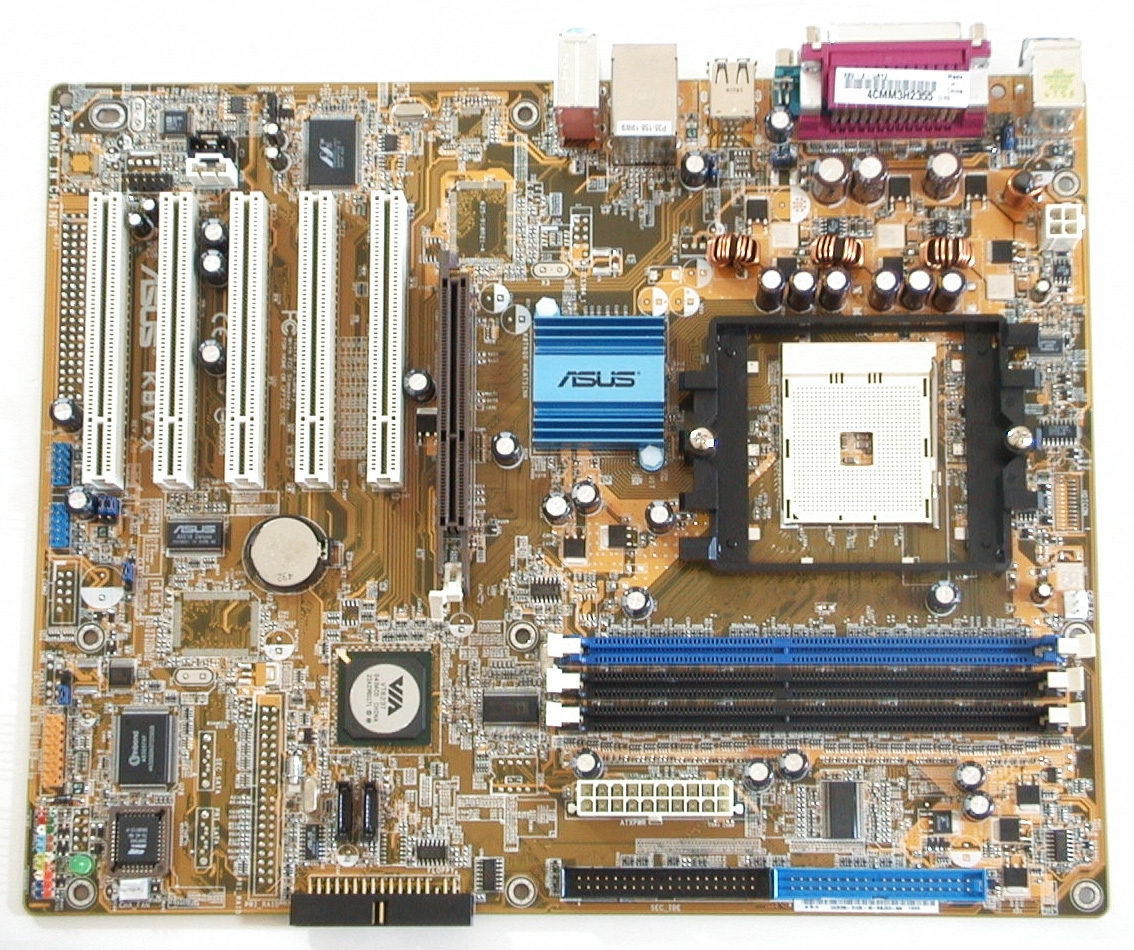
    K8V-X Asus motherboard

    thx
    sry for the blurry photos, my camera has diffculties with macro lock-on in dark areas
  • idebo

    #2
    Re: Little confused with HD installation

    This is the graphics section, not the hardware section... I don't know who told you that, but post it in offtopic... lol.

    Comment

    • |CBW|Simon

      #3
      Re: Little confused with HD installation

      Your power supply will probably be fine as long as it is still running well.

      The middle picture is an old connector type. The bottom picture is what IDE drives currently use. Make sure that your motherboard has two ide ports on it. Each of these ports will be side by side and have an IDE cable attached. Probably on the motherboard they will be labeled Primary and Secondary. You want to be sure that from motherboard there are only two devices per port that are hooked up. Respectively the outer device will be primary and the one in between the motherboard and the outer will be the slave. Most devices have settings for Primary, Slave or Cable Select (CS) but I normally suggest you manually changing your jumpers to Primary and Select. if the jumpers on your current devices are not labeled (and they should be) then you can find the pin outs on the manufacturers website.

      As to cabling. Yes yours looks like a bird's nest. There are corded ribbon cables from driver and floppys that will improve your airflow and make it all look better.

      And this should actually go in the "Tech Center" or "BF2 Support" sections

      Comment

      • Mayflower
        Member
        • Jun 2005
        • 833

        #4
        Re: Little confused with HD installation

        Thx CBWsimon, someone could move this to the right section , sry bout that

        I tried to solve your explanation, but I think I'll wait till I have my HD and my case opened in front of me.
        But it's pretty sure that the hard drive WILL be compatible with my computer right ?

        here's a image I found of my motherboard


        thx again

        Comment

        • |CBW|Simon

          #5
          Re: Little confused with HD installation

          Yes, on the outer edge of the motherboard (towards your drives) the Blue port is the primary, the one next to it, the secondary. Each of those will have a ribbon cable that goes to a maximum of two things.

          Now for the good/bad part. You have SATA ports. If possible, take back your IDE Drive and get a SATA drive. Make it your primary boot drive and load windows and BF2 on to it and your game verification time will go WAY down. Sata > IDE

          Comment

          • Mayflower
            Member
            • Jun 2005
            • 833

            #6
            Re: Little confused with HD installation

            Originally posted by |CBW|Simon
            Yes, on the outer edge of the motherboard (towards your drives) the Blue port is the primary, the one next to it, the secondary. Each of those will have a ribbon cable that goes to a maximum of two things.

            Now for the good/bad part. You have SATA ports. If possible, take back your IDE Drive and get a SATA drive. Make it your primary boot drive and load windows and BF2 on to it and your game verification time will go WAY down. Sata > IDE
            Yea i noticed about the SATA ports. But since my HD is a big promotion, I decided to buy that one. it's IDE, but right now, Im happy with my loading time.
            However, is it possible that the HD specified IDE could support SATA, i mean there's IDE and SATA.
            So if by any way I end up with a SATA HD, you said I plug the SATA one on the SATA primary plug then I plug my actual IDE on the IDE secondary ?

            thx very much for you advices

            Comment

            • Stormy{CAN}
              Member
              • Apr 2007
              • 958

              #7
              Re: Little confused with HD installation

              Glad Futureshop has it for $80 off,


              Here's pretty much the same drive (this one has 16 mb of cahche insyead of 8 mb) in SATAII,


              As far as room for another hard drive from the looks of it there is space to mount 6 of them.

              Comment

              • |CBW|Simon

                #8
                Re: Little confused with HD installation

                Originally posted by Sir. Mayflower
                However, is it possible that the HD specified IDE could support SATA, i mean there's IDE and SATA.
                So if by any way I end up with a SATA HD, you said I plug the SATA one on the SATA primary plug then I plug my actual IDE on the IDE secondary ?

                thx very much for you advices
                There is IDE or Sata (not and) when it comes to hard drives. One drive will not support both, but one motherboard can. it's all about the controller card built into the hard drive. PATA, SATA, IDE or a host of other ones.

                You plug SATA into the SATA, leave your IDE however you had them. Go into your computers BIOS at startup (usually DEL or F2 or something) and set it to boot from SATA.

                If you get a MAXTOR SATA (not my own first choice) it comes with nifty software to copy the primary drive to the SATA for you so you don't have to reinstall anything.

                Simon

                Comment

                Working...