ATI Driver help

Collapse
X
 
  • Time
  • Show
Clear All
new posts
  • Pwndaddy

    #1

    ATI Driver help

    I have an Radeoon X850 Pro AGP 256 MB my problem is that i cant find my CD so i do not know what Catalist version to use. Before my computer was wiped the CD driver and catalist were working perfectly. since i do not know what to use i Downloaded the latest drivers but that doesnt work for me i always ge the Hateful VPU recover when PLAYING SOLITAIRE!!!!

    Will some wiz please tell me what the best Catalist version is for the X850 Pro!:cry::cry:
  • mlkmnz

    #2
    Re: ATI Driver help

    I'm using the current one with an X800XT PE and it works fine.

    Comment

    • iNvAzN

      #3
      Re: ATI Driver help

      just use the new ones...Catalyst 6.7

      Comment

      • Pwndaddy

        #4
        Re: ATI Driver help

        Originally posted by iNvAzN
        just use the new ones...Catalyst 6.7
        i did but i seem to get A LOT of VPU Recovery poppups.

        Could it be that i havent updated my DirectX??

        Comment

        • iNvAzN

          #5
          Re: ATI Driver help

          I'm not sure if DX will affect it...maybe you can try the tweaked omega or warcat drivers?

          Comment

          • Pwndaddy

            #6
            Re: ATI Driver help

            Alright guys i have one BIG problem

            With the ATI 5.10 Drivers my DIrectX and Direct3D are fully working
            With the ATI 6.7 Drivers Both DirectX and Direct3D are NOT WORKING

            i sent an email to ATI and all i got back was an automated message which didnt help.

            You guys have any ideas??

            Comment

            • iNvAzN

              #7
              Re: ATI Driver help

              Maybe just stay with the 5.10 drivers for the time being until better versions come out, but you can also ask the guys at Tom's Hardware for some extra assistance....

              Comment

              • mlkmnz

                #8
                Re: ATI Driver help

                First off I would uninstall all your drivers and also "remove" the card from device manager so you can start anew. Then reinstall some new drivers and try running some diagnostic tools.

                Comment

                • Pwndaddy

                  #9
                  Re: ATI Driver help

                  Originally posted by mlkmnz
                  try running some diagnostic tools.
                  Any suggestions on some good ones?

                  but i will try to do what you suggested

                  Comment

                  • mlkmnz

                    #10
                    Re: ATI Driver help

                    I'd try running Direct X Diagnostics to start with - that will check and see if you have all the required DX files and also run some standard tests on your card. In case you haven't used it before, you start it by typing "dxdiag" in the run command from your start menu.

                    Comment

                    • Pwndaddy

                      #11
                      Re: ATI Driver help

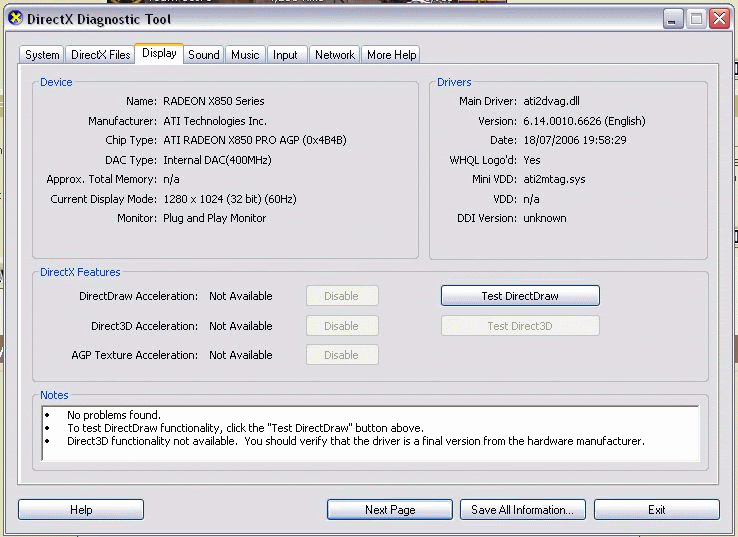
                      Well i did that and look what i got!
                      BTW: i Went and Downloaded the latest DirectX Drivers and it said no update necessary

                      Comment

                      • mlkmnz

                        #12
                        Re: ATI Driver help

                        Originally posted by Pwndaddy
                        Well i did that and look what i got!
                        BTW: i Went and Downloaded the latest DirectX Drivers and it said no update necessary
                        There's no picture there.

                        And did u run dxdiag?

                        Comment

                        • Pwndaddy

                          #13
                          Re: ATI Driver help

                          There well i got a better picture

                          How do i run the diagnostics?
                          i just start DX Diag and look at what it shows

                          Comment

                          • mlkmnz

                            #14
                            Re: ATI Driver help

                            "Test directdraw"

                            The fact you dont have the option to test direct3d is a concern - did you reinstall your drivers?

                            EDIT:scratch the driver question, I can see in the pick it finds a driver.

                            Comment

                            • Pwndaddy

                              #15
                              Re: ATI Driver help

                              Yep and this is what i got

                              Comment

                              Working...