
hey guys, whats a good program to see the tempreture of your computer like the cpu or video card or whatever. I need a good trusted one. Because i want to see the temp on my computer after playing bf2.
-
-
Re: Program to see temps
I'm a big fan of ASUS Probe:
-
Re: Program to see temps
cool. Does it take a long time to download? anyone else have some good ones?Comment
-
Re: Program to see temps
Motherboard monitor, speedfan works. I like speedfan for quick low mess set up, but mobo is old and dependable.Comment
-
Re: Program to see temps
so... which one?Comment
-
Re: Program to see temps
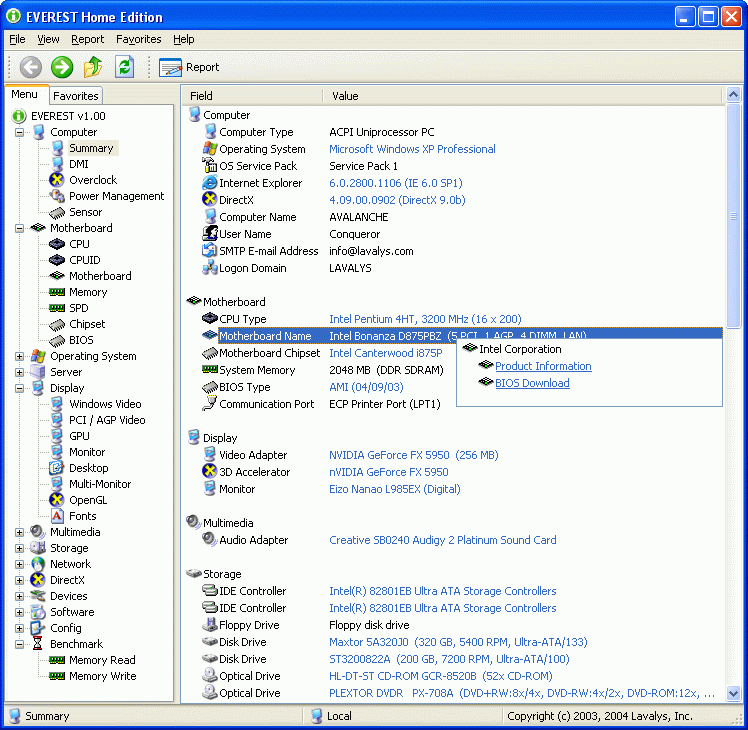
I use everest Home Edition... Just run it and it tells you everything you'd ever want to know about your machine...
http://www.majorgeeks.com/EVEREST_Fr...ion_d4181.html
I highly recommend this and I think it is your best bet.Comment
-
Re: Program to see temps
what is one that can show my the temps of my computer?Comment
-
Re: Program to see temps
Everest home edition... give me a second to post a screenshot...
EDIT:
Here, notice there is tons of other sections to look under and see other info on your computer... This section tells you your temperatures

Comment
-
Re: Program to see temps
cool. Can you give me the site to download it from?Comment
-
-
Re: Program to see temps
which do i download the Special edition or the EVEREST Corporate Edition?
and is this for the U.K only or can i do it from the us?
wait there is no Home edition did it get cancled or sumthin?Comment
-
Re: Program to see temps
Warhawk you need to read the everest site a little more,
That being said you can still download the last free version of Home from here,LAVAL, CANADA – December 5, 2005 – After 10 years of active development and presence in the freeware market, EVEREST Home Edition (the successor of AIDA32) is being discontinued on December 1, 2005 however, all online content related to freeware products are removed from our website already. Lavalys will continue to support this product for all users until March 2006, we will not be actively developing any new features or functionality going forward.
Comment
-
Re: Program to see temps
Try using speedfan, it'll tell you all your temps.Comment
-
Re: Program to see temps
And be back 5 minutes later asking what Temp1, Temp2, etc all are for.Originally posted by Sir. MatDef
Anyway, I agree with going with Speedfan. Once you figure out which temp is which (and which one(s) are phantom readings), Speedfan is great. And this is how you set it up,
Go into the bios and check the Hardware Monitoring section, make note of what temps are reported there and then match those numbers up with what is reported in Speedfan. If after doing that and you have one or two in Speedafn that don't have numbers in the bios, then they are most likely phantom readings (monitoring chip supports the reading, but there is no sensor to read from), as Speedfan gets its readings from the monitoring chip on the mobo and not from the bios.
Then once you have matched them up, if you want too you can rename them from fan1, fan2, etc. All you do is open the configuration screen and click on each one you want to change and hit F2, then change the name accordingly.Comment
-
Re: Program to see temps
I know it is being discontinued, so is motherboard monitor, that doesn't mean people shouldn't use it anymore... For now it still works wonderfully. I just posted the wrong link on accident.... editing now.Originally posted by Stormy{CAN}Comment



Comment