We continue to work behind the scenes to bring new enhancements to the PS5 experience, and today we are excited to announce two key additions based on player feedback – audio focus and the return of the classic console designs for the PS5 UI.
The PS5 system update will roll out globally in a phased approach, starting April 24.
Here are details of the new features:
Audio Focus
Audio focus increases immersion by providing presets to amplify soft sounds to meet your hearing preferences, ensuring a clearer audio experience when using headphones or headsets. This feature supports broader accessibility in audio experiences.
Play Video
src="https://blog.playstation.com/content/themes/playstation-2018/images/placeholder.svg"
data-srcset="https://img.youtube.com/vi/2mcxoinz9zM/default.jpg 120w, https://img.youtube.com/vi/2mcxoinz9zM/mqdefault.jpg 320w, https://img.youtube.com/vi/2mcxoinz9zM/hqdefault.jpg 480w, https://img.youtube.com/vi/2mcxoinz9zM/sddefault.jpg 640w, https://img.youtube.com/vi/2mcxoinz9...resdefault.jpg 1280w"
data-sizes="(min-width: 1170px) 936px, (min-width: 960px) 80vw, 100vw"
data-src="https://img.youtube.com/vi/2mcxoinz9zM/hqdefault.jpg"
class="youtube-video__image-overlay lazy"
alt="New PS5 System Software update features audio focus and the return of the classic console UI customizations"
>
When the audio focus setting is turned on, you can choose from a range of preset options which makes it easier to distinguish sounds like in-game character dialogue, subtle sound effects such as footsteps and rustling grass, as well as voices in party chats for a more immersive gaming experience.
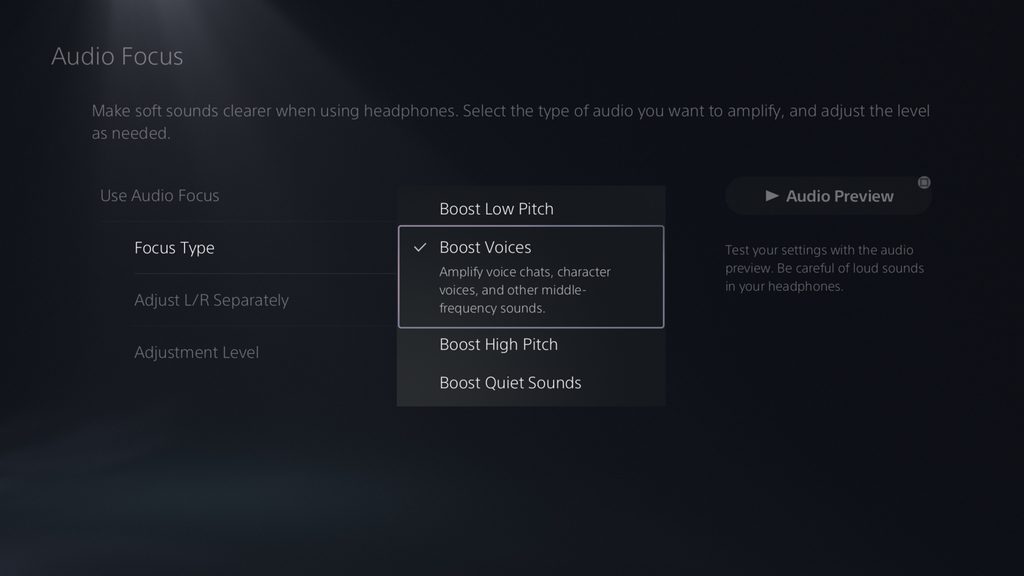
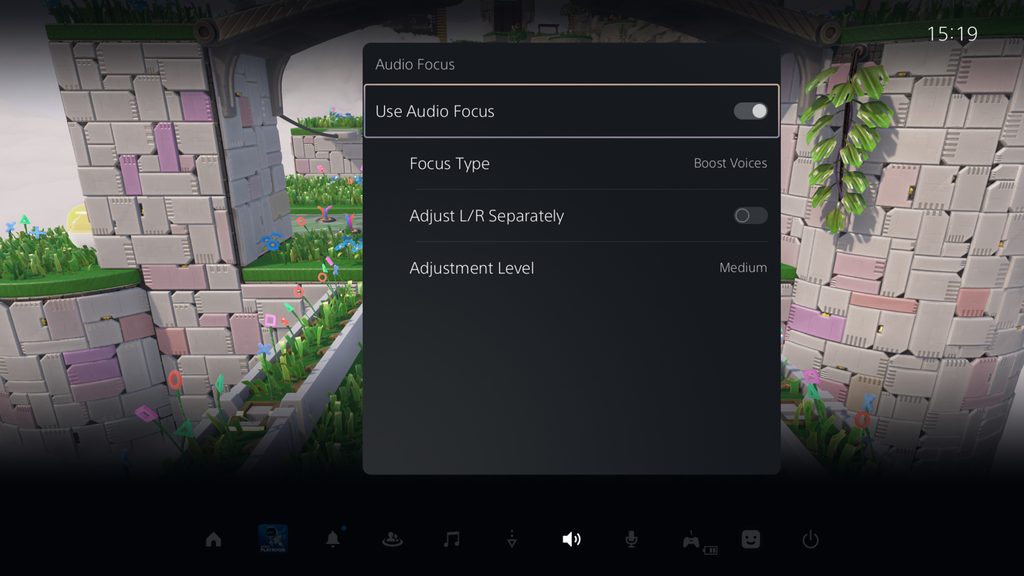
● To enable audio focus, go to [Settings] > [Sound] > [Volume] > [Audio Focus]. This feature can also be accessed from the Control Center, so you can easily adjust the settings during gameplay.
● You can choose from four preset focus type options for which sounds to boost:
- Boost Low Pitch: Amplify low-frequency sounds like roaring engines and rumbling noises.
- Boost Voices: Amplify voice chats, character voices, and other middle-frequency sounds.
- Boost High Pitch: Amplify high-frequency sounds like footsteps and metallic noises.
- Boost Quiet Sounds: Amplify low-volume sounds in a wide range of frequencies.
● You can set the level of support for each preset type from three different levels (Weak, Medium, Strong).
● Additionally, you can also choose to adjust the level of support for the preset for Left / Right channels separately to meet your specific preferences.
● The audio focus feature is available when using headphones connected via USB or analog jack. It is not supported for HDMI connections through TV, AV receivers or soundbars.
class="ps-image-modal__trigger"
type="button"
>
View and download image
class="ps-image-modal ps-image-modal--hidden"
role="dialog"
hidden
tabindex="-1"
aria-hidden="true"
aria-labelledby="ps-image-modal-heading-1"
>
Download the image
close
Close
class="ps-image-modal__image ps-image-modal__image--hidden"
data-src="https://blog.playstation.com/tachyon/2025/04/de2ffcd9776115b7127b65c5526524b97baa8bfc.jpg"
alt=""
data-recalc-dims="1">
Download this image
class="ps-image-modal__trigger"
type="button"
>
View and download image "PS5 UI screenshots showing audio focus settings menu"
class="ps-image-modal ps-image-modal--hidden"
role="dialog"
hidden
tabindex="-1"
aria-hidden="true"
aria-labelledby="ps-image-modal-heading-1"
>
Download “PS5 UI screenshots showing audio focus settings menu”
close
Close
class="ps-image-modal__image ps-image-modal__image--hidden"
data-src="https://blog.playstation.com/tachyon/2025/04/adcb166d6a8509cce9934f58bcf987045e9adc73.jpg"
alt=" "PS5 UI screenshots showing audio focus settings menu""
data-recalc-dims="1">
Download this image
Classic console designs for the PS5 UI returns
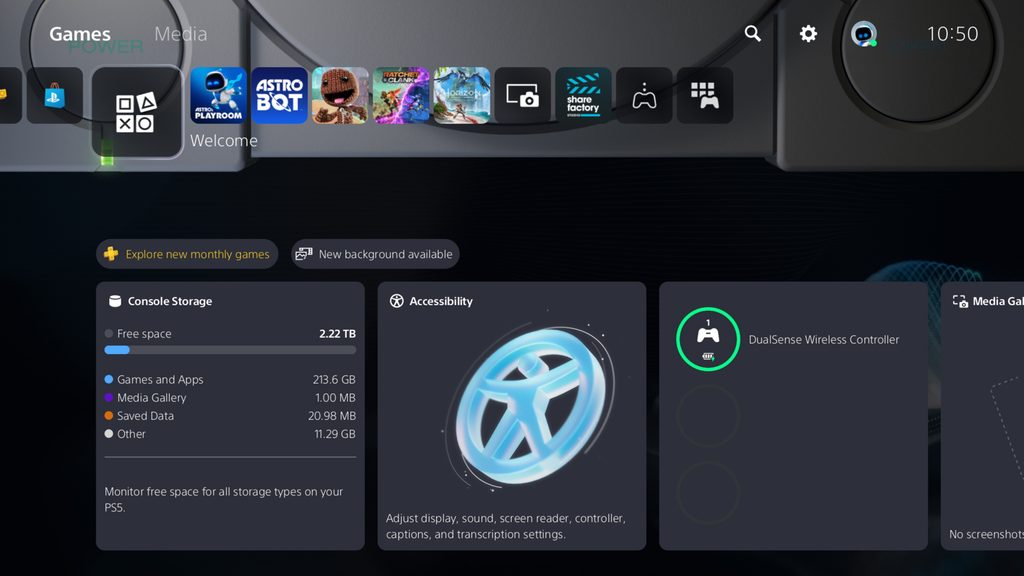
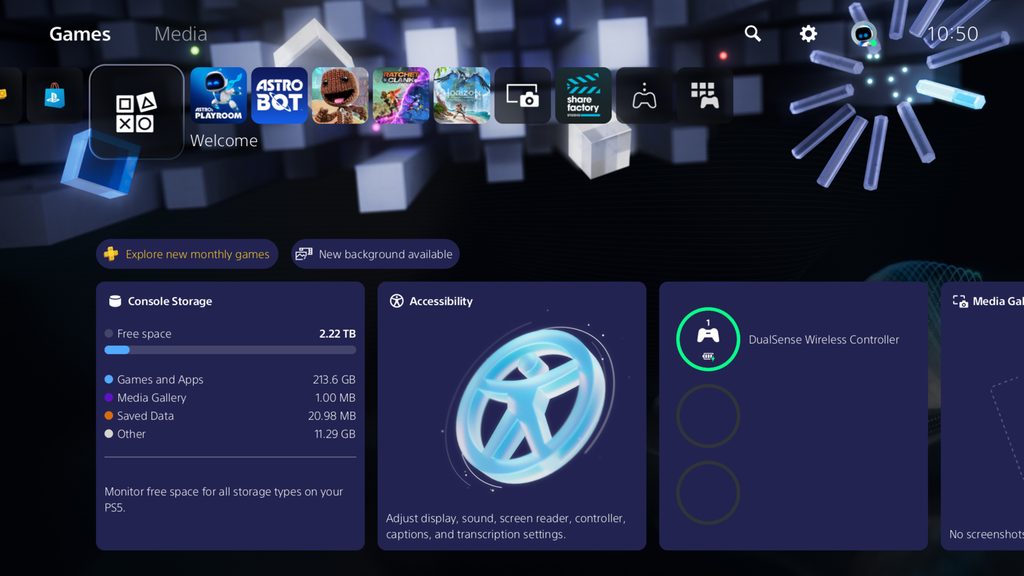
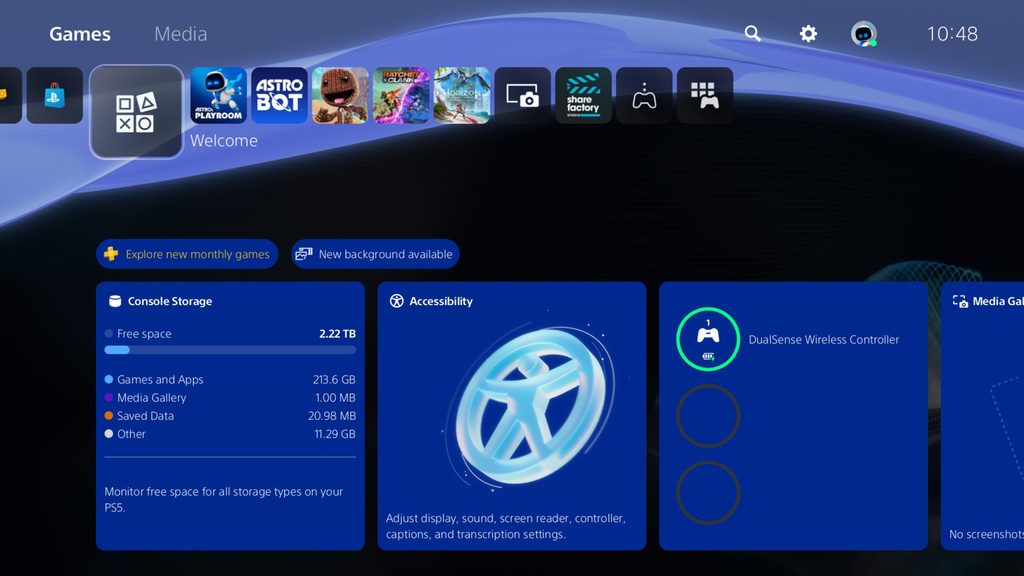
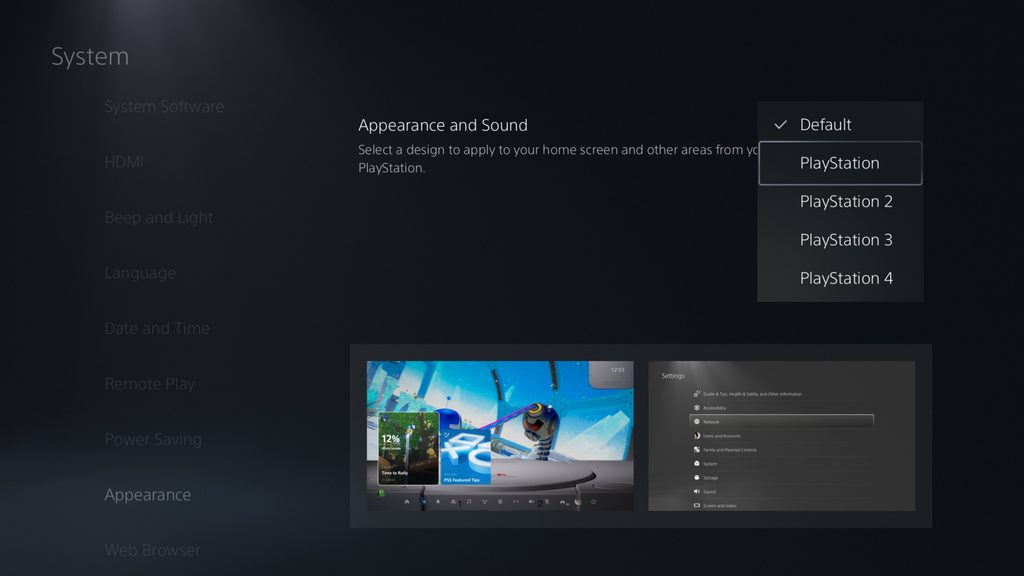
During our 30th anniversary celebrations, we surprised our fans with a limited time selection of nostalgic customization features for the PS5 System UI to honor the four PlayStation consoles that paved the way for PS5: PlayStation, PlayStation 2, PlayStation 3, and PlayStation 4.
Due to the overwhelmingly positive response from our community, we’re happy to bring back the look and feel of the four console designs for players to customize the home screen on PS5!
class="ps-image-modal__trigger"
type="button"
>
View and download image "Classic console designs main menu customization"
class="ps-image-modal ps-image-modal--hidden"
role="dialog"
hidden
tabindex="-1"
aria-hidden="true"
aria-labelledby="ps-image-modal-heading-1"
>
Download “Classic console designs main menu customization”
close
Close
class="ps-image-modal__image ps-image-modal__image--hidden"
data-src="https://blog.playstation.com/tachyon/2025/04/ad2349a4d50fff0ea8f5b588c78b175f4a950b3e.jpg"
alt=" "Classic console designs main menu customization""
data-recalc-dims="1">
Download this image
class="ps-image-modal__trigger"
type="button"
>
View and download image
class="ps-image-modal ps-image-modal--hidden"
role="dialog"
hidden
tabindex="-1"
aria-hidden="true"
aria-labelledby="ps-image-modal-heading-1"
>
Download the image
close
Close
class="ps-image-modal__image ps-image-modal__image--hidden"
data-src="https://blog.playstation.com/tachyon/2025/04/b0c2353972d1a2c5c32c66568d43ab1028dfe7cf.jpg"
alt=""
data-recalc-dims="1">
Download this image

class="ps-image-modal__trigger"
type="button"
>
View and download image
class="ps-image-modal ps-image-modal--hidden"
role="dialog"
hidden
tabindex="-1"
aria-hidden="true"
aria-labelledby="ps-image-modal-heading-1"
>
Download the image
close
Close
class="ps-image-modal__image ps-image-modal__image--hidden"
data-src="https://blog.playstation.com/tachyon/2025/04/b7a28ac91ac936c1d56b7e32769ff7e4f525702a.jpg"
alt=""
data-recalc-dims="1">
Download this image
class="ps-image-modal__trigger"
type="button"
>
View and download image
class="ps-image-modal ps-image-modal--hidden"
role="dialog"
hidden
tabindex="-1"
aria-hidden="true"
aria-labelledby="ps-image-modal-heading-1"
>
Download the image
close
Close
class="ps-image-modal__image ps-image-modal__image--hidden"
data-src="https://blog.playstation.com/tachyon/2025/04/1b8c2f352a66e11c6143c04964b81004e9aa571c.jpg"
alt=""
data-recalc-dims="1">
Download this image
This feature will be called the Appearance, and can be accessed under the Settings menu.
class="ps-image-modal__trigger"
type="button"
>
View and download image "Appearance and Sound settings menu"
class="ps-image-modal ps-image-modal--hidden"
role="dialog"
hidden
tabindex="-1"
aria-hidden="true"
aria-labelledby="ps-image-modal-heading-1"
>
Download “Appearance and Sound settings menu”
close
Close
class="ps-image-modal__image ps-image-modal__image--hidden"
data-src="https://blog.playstation.com/tachyon/2025/04/c965f6f4abbf6a2ff4a083fef06b1f5001d932ef.jpg"
alt=" "Appearance and Sound settings menu""
data-recalc-dims="1">
Download this image
We’re excited to bring the update to you and would love to hear your thoughts on them. Which features are you looking forward to seeing? Share your comments below!
More...